
B2B SaaS businesses achieve an average ROI of 702% from SEO, yet most teams are still using a SaaS SEO tool stack built for a different era of search.

For marketing teams that haven’t revisited their SaaS SEO tech stack recently, now is the time. The tools that powered growth two or three years ago may no longer cut it in an environment where visibility in AI-generated answers matters just as much as a first-page ranking.
This guide covers 13 SaaS SEO tools. We selected each tool for a specific SaaS SEO workflow, covering research and technical audits, content optimization, AI search visibility, internal linking, and reporting.
Table of Contents
- What are SEO tools for SaaS?
- Why SaaS SEO Tools Matter For Growth
- Features to Look for in an SEO Tool for SaaS
- Best SaaS SEO Tools
- SaaS SEO Tool Stack by Team Size
- Frequently Asked Questions About SaaS SEO Tools
What are SEO tools for SaaS?
SEO tools for SaaS are software platforms that help SaaS companies research, create, optimize, and measure content to improve visibility in search engines. The right tools support the full workflow without requiring teams to switch between disconnected platforms at each stage.
While many SEO tools support several industries, some perform better for SaaS than others. SaaS teams need SEO tools because their websites typically serve multiple buyer journeys simultaneously.
A SaaS company isn’t just trying to rank a product page; it’s trying to educate buyers at every stage of the funnel while competing for visibility against authoritative websites like G2 and Capterra. The right SEO SaaS tools need to support that complexity.
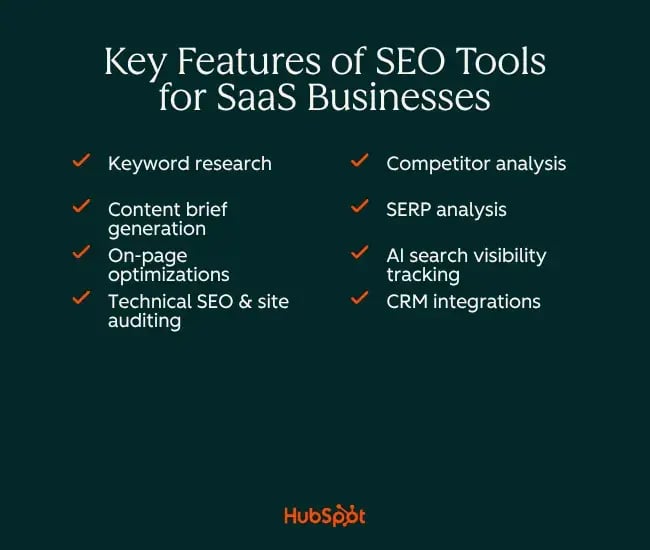
Specifically, SaaS teams need tools that address:
- Scalable keyword research across the full funnel from broad awareness terms to high-intent, bottom-of-funnel queries like “best [category] software for [use case],” where customers decide to buy (or not).
- Content brief generation and on-page optimization to maintain quality and consistency as content production scales across writers, freelancers, and AI-assisted workflows.
- Technical SEO auditing of SaaS sites often reveals rapid growth, leading to crawl issues, duplicate content, and broken internal links that quietly erode rankings.
- Competitor and SERP analysis to stay current on what competitors rank for, where content gaps exist, and how SERP features are shifting in the category.
- AI search visibility tracking to measure and optimize for brand and content presence in AI Overviews, generative search results, and other emerging SERP surfaces.
- CRM and attribution integration to connect organic traffic to the pipeline and revenue. Good reporting is how SEO specialists justify SEO investment from leadership.
Why SaaS SEO Tools Matter For Growth
The case for investing in SaaS SEO has never been stronger. Organic search is one of the few channels that compound over time, making it especially valuable for SaaS teams under pressure to reduce customer acquisition costs. Unlike paid advertising, organic traffic doesn’t stop the moment spending pauses
Tip: If exploring strategies to grow a SaaS business, SEO is consistently among the highest-leverage investments available.
But raw SEO effort alone isn’t what separates high-growth SaaS companies from the rest; it’s the systematic use of the right tools.
SEO tools replace guesswork with data across search, content, and attribution. Without dedicated tooling, teams default to publishing based on gut instinct, running audits manually, and struggling to connect organic traffic to revenue. The right platform replaces that guesswork with automation and clear workflows that every team member can act on.
There’s also a search reality to account for. After the top three results on the first page of Google’s SERP, CTR drops into single digits.
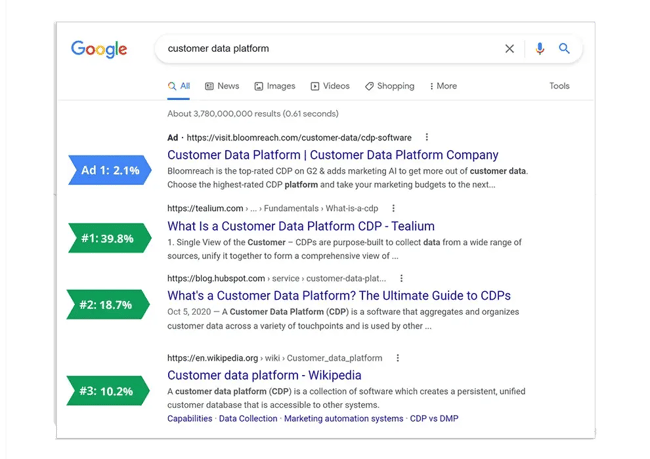
In practice, this means that in most SaaS categories, ranking outside the top three is nearly the same as not ranking at all. SaaS teams that invest in the right tools can more effectively claim and defend those top spots, while also appearing in AI-generated answers that increasingly reshape the SERP, particularly early in the buyer journey during discovery phases, when most people use AI to find SaaS products.
Features to Look for in an SEO Tool for SaaS
Before a SaaS team chooses an SEO tech stack, it should identify the features its workflow actually needs.
Each SaaS team’s needs will vary, but these five features should guide tool selection.
1. Keyword Research and Competitive Intelligence
For SaaS companies, keyword research isn’t just about finding high-volume terms; it’s about finding the right terms that signal intent and mapping search intent across the entire buyer journey, from awareness to decision.
The best SaaS SEO tools surface not only what people are searching for but also why they’re searching, what competitors are ranking for, and where market gaps exist. That means looking for tools that offer:
- Search Engine Results Page (SERP) analysis
- Keyword difficulty scoring
- Competitor keyword overlap
- Keyword intent
Need help building a strategy? Read: How to Create a B2B SEO Strategy in 9 Steps
From my experience, teams that win at SaaS SEO aren’t necessarily the ones targeting the highest-volume keywords just to get traffic. They’re the teams that find specific, high-intent queries that encourage clicks from qualified traffic. While keyword research is important and the third-party tools mentioned below are valuable, SEO teams must also use Google Search Console (GSC) for this — more on GSC and why it’s an essential in a SaaS SEO tech stack later.
2. Technical SEO Auditing
Technical SEO provides the foundation for everything else. If a site has crawl errors, slow page speeds, broken internal links, duplicate content, or indexation issues, even the best content strategy won’t move the needle.
SaaS sites, in particular, are prone to technical issues because they’re often large. Over time, product pages multiply, subdomains sprawl, and development cycles often fail to prioritize SEO hygiene because other, more exciting tasks compete for valuable development resources. A strong SEO SaaS platform should offer automated site crawling, issue prioritization, and clear guidance on fixing problems.
For a deeper look, this beginner’s guide to technical SEO is a solid starting point.
I’ve seen SaaS sites leave significant ranking potential on the table simply because nobody had run a proper crawl in years. I always recommend prioritizing a tool with technical auditing capabilities before investing in anything else. The goal is to create a clean foundation before scaling content, otherwise things just get messier! Once an organization lays the foundations, it can maintain this standard with relative ease.
3. On-page Content Optimization
Content optimization tools are a must-have. They offer a range of support for SaaS SEO strategies, including analyzing pages against top-ranking competitors and surfacing specific recommendations to improve relevance, coverage, and structure.
SaaS teams that are scaling content production often manage multiple writers, freelancers, and AI-assisted workflows. Using a SaaS SEO tool means there’s a consistent quality benchmark — and it’ll happen automatically thanks to AI. Look for tools that offer real-time scoring, semantic term suggestions, readability guidance, and the ability to generate structured briefs so that every piece of content has the strongest chance to rank from the first draft.
I’ve found that on-page optimization tools are some of the most valuable in a SaaS SEO stack, particularly at the briefing stage. They generate data-backed briefs within minutes that writers can act on from day one, shrinking the gap between first draft and publishable content. That efficiency reduces editing costs and keeps team morale in better shape.
4. AI Search and AEO Visibility
As AI search tools like AI Overviews (AIO), AI Mode, ChatGPT, Perplexity, and others increasingly answer queries without a traditional click, SaaS brands need tools that measure and optimize their presence on these new search tools, not just their position on Google.
That means looking for tools that assess how well content is formatted for citation or for AI models to surface. Answer Engine Optimization (AEO) is as important as traditional on-page SEO, and tools that support both give SaaS teams a competitive edge.
AI search is a part of AEO SEO that I’m most excited about. SaaS brands with strong traditional rankings can lose significant traffic to AI Overviews almost overnight, simply because they didn’t structure their content for the AI environment.
5. Reporting, Attribution, and CRM Integration
SEO only earns budget when it can prove revenue impact, and for SaaS companies, that means connecting organic traffic all the way through to pipeline, trials, and closed revenue. Look for tools that offer customizable dashboards, keyword tracking over time, integration with Google Analytics and Google Search Console, and ideally, native CRM connectivity so marketing can attribute leads and customers back to specific content pieces.
Important: The ability to present SEO performance in business terms, not just rankings and impressions, is what separates a strategic SEO program from a cost center.
Over the years, I’ve seen many talented SEO specialists or SEO strategies lose internal interest, and then investment, simply because they couldn’t draw a clear line between SEO efforts and a closed deal. As AIO takes clicks from websites, SEO specialists have to work harder to prove SEO’s value.
Need help convincing stakeholders that your SEO is working? Read my article: How to create an SEO report. It includes best practices and screenshot examples from my own report.
Best SaaS SEO Tools
Below are 13 SaaS SEO tools organized by features. I’ve selected tools that each earn their place in a modern SaaS SEO tech stack. I’ve used all of these tools myself, but I’ve also sought some expert tips from other SEO experts.
SEO Tools for SaaS at a Glance
This comparison table compares SaaS SEO tools by category, best for, integrations, and quick wins.
| Tool |
Category |
Best For |
Integrations |
Quick Win |
| HubSpot AEO Grader |
AI Search Visibility |
Benchmarking brand visibility across ChatGPT, Perplexity, and Gemini. |
HubSpot Smart CRM, Marketing Hub |
Run a competitor report as well as your own to surface content and messaging gaps |
| Marketing Hub |
SEO & CRM Platform |
SEO, attribution, and CRM data in one place |
HubSpot Smart CRM, Google Analytics, GSC, Salesforce |
Set up a monthly SEO recommendations scan to catch technical issues before they compound |
| Content Hub |
CMS & Content SEO |
SEO suggestions embedded in writing workflows |
HubSpot Smart CRM, Marketing Hub, Google Analytics |
Implement schema modules by content type to improve AI citation potential without developer support |
| Semrush |
Research & Auditing |
All-in-one keyword research, competitor analysis, and technical auditing |
GSC, Google Analytics, Trello, Zapier |
Run a content gap report against your top three competitors to surface quick content opportunities |
| Ahrefs |
Backlink & Competitor Analysis |
Deep backlink intelligence and organic traffic estimation |
GSC, Google Analytics |
Use the Content Gap tool to find keywords that competitors rank for that your website doesn't |
| Screaming Frog |
Technical SEO |
Granular technical crawling and on-site issue discovery |
GSC, Google Analytics, PageSpeed Insights |
Crawl your site and filter by 3XX and 4XX status codes to find and fix redirect chains and broken links fast |
| Google Search Console |
Search Performance |
Non-negotiable first-party data from Google |
Google Analytics, Looker Studio, most SEO platforms |
Filter queries by impressions with low CTR to find quick wins where a title tag tweak could drive significantly more clicks |
| Bing Webmaster Tools |
Search & AI Monitoring |
First-party AI citation data and Bing indexation monitoring |
GSC import, Microsoft Clarity |
Import your GSC account in one click to get Bing data with zero setup, then check the AI dashboard for citation gaps |
| Surfer SEO |
On-Page Optimization & Briefs |
Data-backed briefs and real-time content scoring |
Google Docs, WordPress, Jasper, ChatGPT |
Run your top five existing posts through the Content Editor and action the quick-win term suggestions before writing anything new |
| Clearscope |
Content Optimization |
Clean, reliable term coverage grading across a large content library |
Google Docs, WordPress, HubSpot |
Grade your ten highest-traffic pages and optimize any scoring below a B, a fast way to recover declining rankings |
| Enfra Chrome Extension |
AI Content Workflow |
Teams using ChatGPT, Claude, or Gemini who want live SERP data injected into their AI workflow |
ChatGPT, Claude, Gemini, GSC |
Use Compare Content to Top 10 on your next draft to instantly surface information gaps before the first edit |
| Link Whisper |
Internal Linking |
WordPress SaaS teams that automated internal link suggestions |
WordPress, Google Analytics |
Run the orphaned pages report and add two to three internal links to each flagged page |
| Yoast SEO |
On-Page SEO & Internal Linking |
WordPress teams that want on-page fundamentals and internal linking in a single plugin. |
WordPress, Semrush, Google Analytics |
Enable internal linking suggestions and act on the top recommendations on your 10 most important pages first. |
SaaS SEO Tools For Briefing, Content Writing, and On-page Optimization
1. Marketing Hub
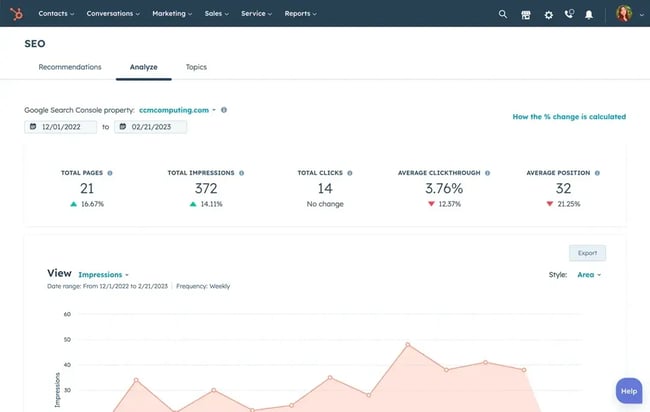
For SaaS teams looking to manage SEO, reporting, and CRM attribution in one place, Marketing Hub offers built-in SEO tools for planning, optimization, and performance analysis. The SEO features in Marketing Hub surface recommendations across the content lifecycle, from topic planning to ongoing reporting, without forcing teams to manage another disconnected point tool.
The SEO recommendations feature is one of the most useful elements of the tool. It allows teams to scan their entire live website, including pages hosted outside HubSpot, and surface prioritized recommendations across technical SEO, on-page optimization, and accessibility.
Marketing Hub categorizes issues by their potential SEO impact and technical difficulty, so content teams and developers each know exactly what to act on. Marketing Hub helps marketers analyze SEO performance at both the domain and individual page level, tracking organic sessions, impressions, and keyword positions over time, all within the same platform where campaigns, contacts, and CRM data live.
What makes Marketing Hub particularly valuable for SaaS teams is the native CRM integration. Attribution is notoriously difficult to achieve when an SEO tool sits separately from a CRM, and it’s one of the most common pain points I hear from SaaS marketing leaders.
It’s also worth noting that several of Marketing Hub’s SEO recommendations extend into AEO territory. Features like structured data recommendations and schema guidance help ensure content follows a format that AI systems can parse and cite, meaning the company is not just optimizing for Google, but for the AI-generated answers that SaaS buyers increasingly see first.
Key Features
- SEO recommendations: Scans website pages and surfaces recommendations across technical SEO, on-page optimization, mobile experience, and accessibility.
- SEO performance reporting: Helps teams analyze SEO performance by domain and page, including organic sessions, impressions, and keyword positions.
- CRM-connected attribution: Connects SEO performance to contact and pipeline data through HubSpot Smart CRM so that teams can tie organic traffic to business outcomes.
Best for: SaaS teams that want SEO, CRM, and content performance data unified in a single platform, without stitching together multiple point tools.
Pricing: Marketing Hub has a free edition. Paid editions start with Marketing Hub Starter at $10/month per seat. Marketing Hub Professional starts at $890/month with three Core Seats included, and Marketing Hub Enterprise starts at $3,600/month with five Core Seats included.
What we like: For teams already using HubSpot for marketing automation and contact management, activating the SEO features in Marketing Hub is easy (and completely necessary!).
Pro tip: Use the SEO recommendations scan on a rolling monthly basis, not just as a one-off audit. SaaS sites change quickly as new product pages, blog posts, and landing pages can introduce technical issues faster than many teams realize. Setting a recurring reminder to review new recommendations keeps the technical foundation clean without requiring a full manual audit.
2. Content Hub
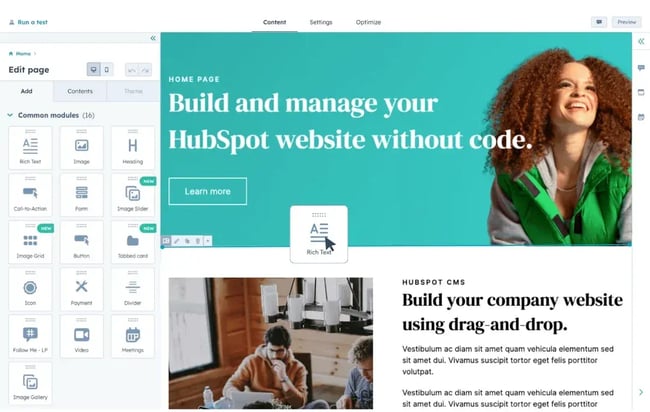
Content Hub supports SaaS SEO workflows by providing content teams with SEO guidance within the CMS and helping them create, manage, and optimize content in one place. It’s one of the few platforms that make the entire content workflow seamless, from the moment a writer starts drafting to the moment a page goes live.
As teams create content inside Content Hub, the platform surfaces contextual SEO suggestions in real time, directly within the editor. That removes the need for writers to context-switch between a separate optimization tool and their CMS.
The AI content writer built into Content Hub supports AI-assisted drafting and content generation that remains aligned with your SEO requirements. For SaaS teams scaling output across a growing content calendar, this is a meaningful efficiency gain, particularly when combined with the topic cluster framework available in Marketing Hub, which gives writers clear direction on what to cover and how to structure it.
Content Hub becomes especially powerful for forward-thinking SaaS SEO teams through its support for structured data and schema markup. HubSpot’s CMS allows teams to implement JSON-LD schema directly within templates and modules, so content can be schema-ready from the outset.
As the HubSpot developer team explains in their guide on using structured data and schema markup in HubSpot to improve SEO, there are two implementation approaches: at the template level for consistent schema across content types, or via custom modules for more granular control over individual pieces. For SaaS teams investing in AEO, this is significant: structured data is one of the most reliable signals that helps AI systems accurately parse and cite content in generated answers.
Key Features
- In-editor SEO suggestions: Surfaces SEO guidance while writers draft and edit content inside the CMS.
- AI content writer: Helps teams create AI-assisted drafts and content variations while keeping the workflow inside Content Hub.
- Schema-ready content support: Allows teams to add structured data through templates or custom modules, helping search engines and AI systems parse page content more clearly.
Best for: SaaS content teams that want SEO guidance embedded directly into their writing workflow, and want to build schema-ready content at scale without relying on developer intervention for every page.
Pricing: Content Hub has a free edition. Paid editions start with Content Hub Starter at $10/month per seat, with a limited-time new-customer price shown at $10/month per seat. Content Hub Professional starts at $500/month with three seats included, and Content Hub Enterprise starts at $1,500/month with five seats included.
What we like: Content Hub brings SEO guidance into the CMS, so writers can optimize content as they draft rather than switching between separate tools.
Pro tip: Use Content Hub’s schema module approach rather than a template-level implementation if your SaaS site publishes multiple content types, such as blog posts, case studies, product pages, and comparison pages. Different schema types (Article, FAQPage, Product, SoftwareApplication) will serve each format better, and the modular approach lets your content team select the right schema at publish time without involving a developer each time.
3. Surfer SEO
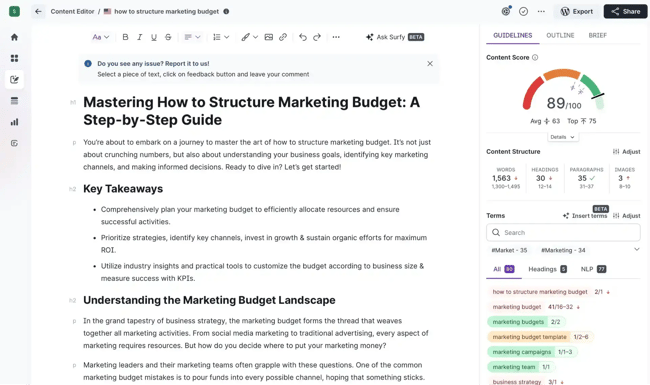
Surfer SEO is used for on-page content optimization and brief guidance, making it a popular choice for SaaS content teams that want a data-driven framework for both planning and polishing content. By analyzing the top-ranking pages for any given keyword, Surfer generates a content score and a set of term-based recommendations that writers can act on in real time, reducing the guesswork that typically slows the editorial process.
Key Features
- Content Editor: Scores content against top-ranking competitors in real time, surfacing recommended terms, word counts, headings, and structural guidance as content teams are writing or editing.
- Brief Generator: Automatically builds detailed content briefs from SERP analysis, including suggested outlines, questions to answer, and competitor insights, helping SaaS teams brief freelancers and AI tools more consistently.
Best for: Content writers and SEO managers who want structured, data-backed briefs and real-time on-page guidance to improve content quality and ranking potential at scale.
Pricing: Surfer’s Standard plan starts at $99/month when billed yearly, with higher tiers available for larger teams and more advanced AI search workflows.
What we like: Surfer SEO gives writers and editors a shared optimization target, which helps SaaS teams brief content, evaluate drafts, and improve existing pages without relying on guesswork.
Manea Stefania, Account & Content Manager at dslx, says, “Surfer SEO is one of the most practical tools I’ve used for keeping content teams aligned on SEO without micromanaging the writing process. I use the keyword research feature to inform my briefs, and then share the Content Editor with writers so they have a clear SEO direction without it limiting their creativity.
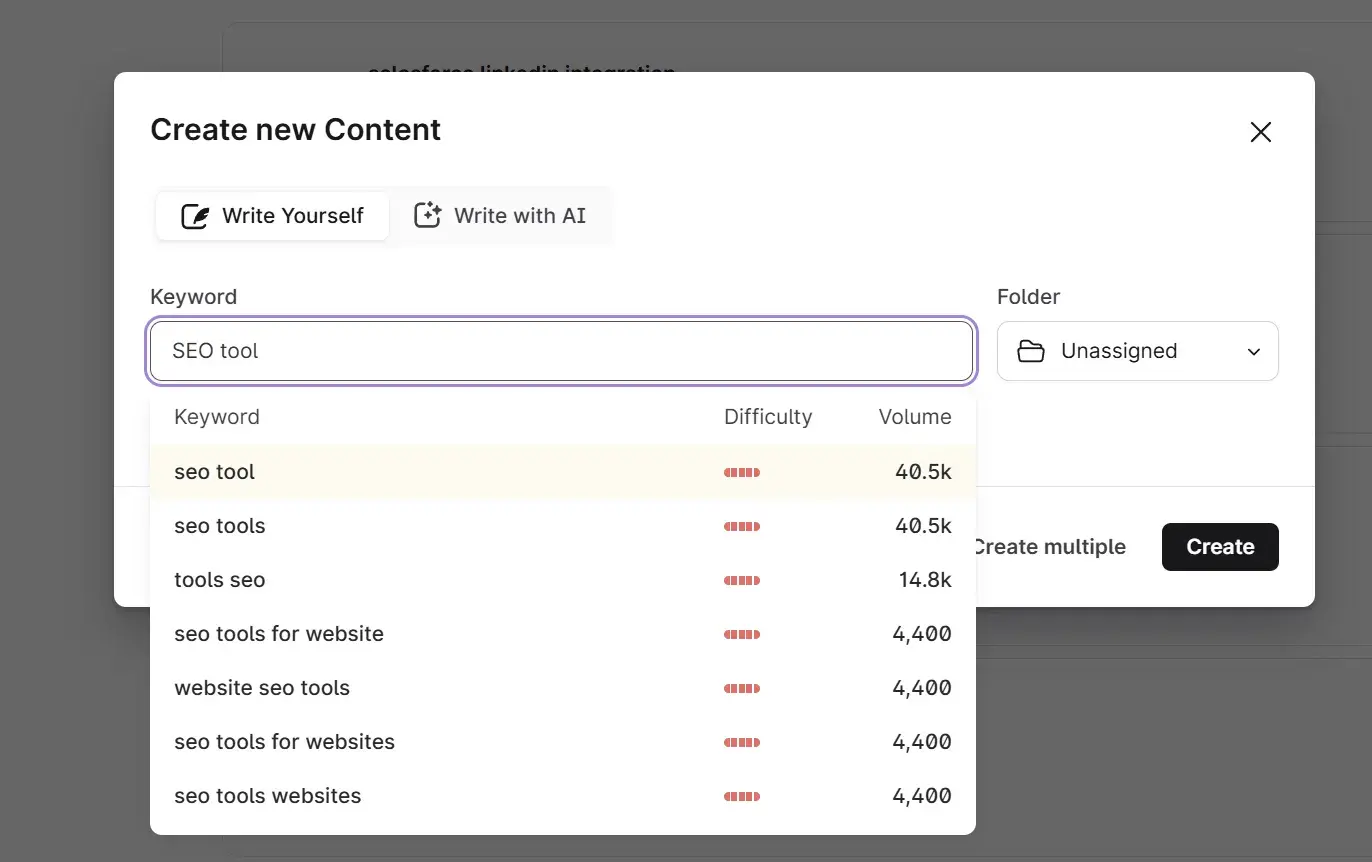
“When briefing writers on competitive topics, I rely on Surfer’s keyword research to identify the right angle and search intent upfront. It’s also worth noting that Surfer can auto-generate outlines based on competing articles and keyword research, a feature I’d highlight for SaaS teams trying to scale their content output, as it can save a significant amount of time.”
4. Clearscope
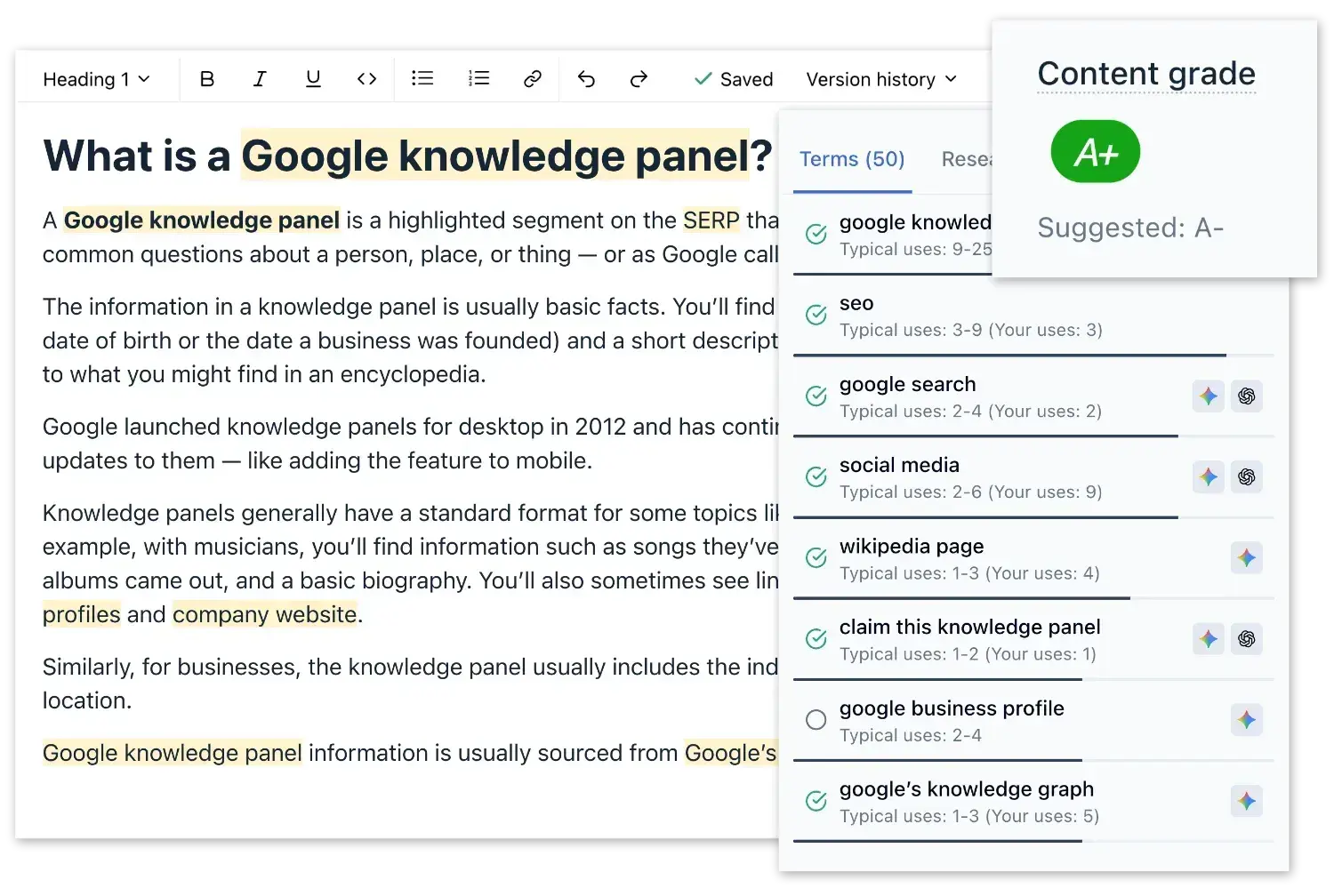
Clearscope is used for content optimization and term coverage checks, helping SaaS content teams ensure their pages cover the full range of terms and topics associated with a given keyword.
Key Features
- Content Grading: Analyzes content against top-ranking pages and assigns a letter grade based on term coverage, giving writers and editors a clear, objective benchmark to hit before publishing.
- Term and Topic Recommendations: Surfaces the specific words and phrases most strongly associated with a target keyword, helping ensure the content comprehensively covers the semantic landscape search engines expect.
Best for: SaaS content teams and editors who want a clean, no-fuss optimization workflow focused on term coverage and content grading across a large library of pages.
Pricing: Clearscope plans start at $129/month for Essentials, with Business at $399/month and custom Enterprise pricing.
What we like: Like Surfer SEO, Clearscope has been around a long time, and I think that track record matters more than people give it credit for. Any tool that has spent years embedded in serious SEO workflows has accumulated a depth of search experience and refinement that newer tools simply can’t replicate overnight. And in my view, the tools with the deepest SEO foundations have the best chance of translating that expertise into AEO performance, because understanding how search engines interpret content also applies to how AI models interpret it.
5. Enfra Chrome Extension
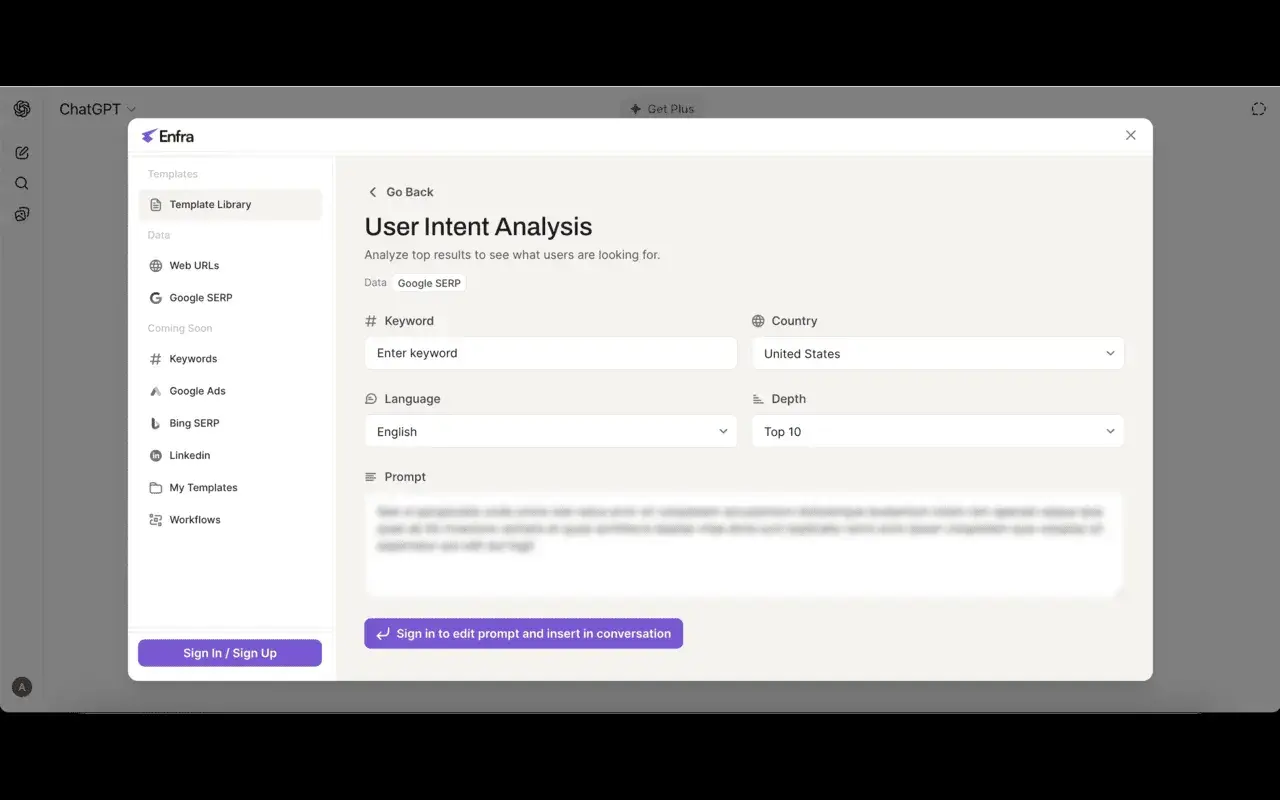
For SaaS teams already using AI tools like ChatGPT, Claude, or Gemini to support content production, Enfra serves as a connective layer between those AI workflows and real-time search data, making it a practical addition to a modern SaaS SEO stack.
Key Features
- Compare Content to Top 10: Analyze drafts against the current top-ranking pages and flag specific information gaps, subtopics, and questions that your competitors cover but your content misses.
- Content Plan for ChatGPT/AI Tools: Injects live SERP data and GSC metrics directly into your AI chat interface, so the model generates briefs and outlines informed by what’s actually ranking right now, including visibility into what users are asking inside AI platforms like ChatGPT and Perplexity.
Best for: SaaS content teams using AI writing tools who want to ground their output in live SERP data and Google Search Console metrics, rather than relying on the AI’s static training knowledge.
Pricing: Enfra’s current public site does not list standard self-serve pricing.
What we like: Enfra helps SaaS content teams bring live search data into AI-assisted workflows, so briefs and drafts can reflect current SERP data rather than relying solely on a model’s training data.
Liz Bowers, SEO Manager at Mosaic eMarketing, recommends this tool. She said, “Enfra is my favorite tool for 2026. It injects live SERP data and your own Google Search Console metrics directly into the interface. Instead of the AI guessing what a ‘good’ article looks like, it sees exactly who is ranking right now and why. For a SaaS company looking to scale, this eliminates hours of manual research.
“I specifically love using the “Compare Content to Top 10” and “Content Plan for ChatGPT” features together,” says Bowers.
“First, I use the Compare feature to have the AI analyze my draft against the current top-ranking pages. It instantly flags ‘Information Gaps’, specific subtopics, or questions the competitors cover that I missed. Then, I run the Content Plan workflow to identify the specific questions users ask in AI tools like ChatGPT and Perplexity. By combining these, I’m not just optimizing for Google’s current blue links; I’m optimizing for the Generative Search era, ensuring our SaaS brand shows up as the definitive answer across all AI platforms,” Bowers explains.
SaaS SEO Tools For SEO Management and Attribution
6. HubSpot AEO Grader
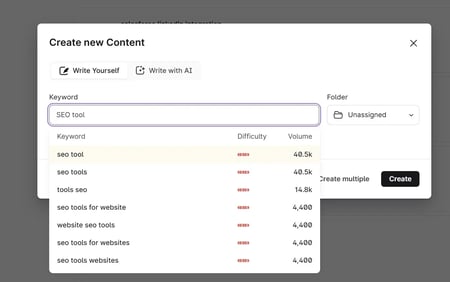
HubSpot’s free AEO Grader is purpose-built for helping SEO teams analyze how their websites perform in AI search, including ChatGPT, Perplexity, and Gemini. AEO grader gives SaaS teams a clear, actionable picture of their AI search visibility at no cost.
The tool works by running automated queries across GPT-4o, Perplexity, and Gemini, replicating the real research patterns prospects use when evaluating solutions in a category.
What makes the AEO Grader particularly valuable for SaaS teams is its competitive analysis capability. Marketers can run reports not just for their own brand, but for any competitor in their space, giving marketing teams a direct comparison of how AI engines represent your brand relative to the market. This kind of share-of-voice intelligence in AI search is something very few tools offer, let alone for free.
The tool also evaluates source credibility, surfacing which third-party publications and sites are influencing how AI models characterize your brand; a key insight for any SaaS team running digital PR or link-building campaigns.
Key Features
- Brand recognition strength: Shows whether AI engines recognize the brand in relevant category conversations.
- Competitive market positioning: Compares how AI engines position the brand against competitors.
- Contextual relevance: Evaluates whether AI engines connect the brand to the right topics, use cases, and buyer questions.
- Sentiment analysis: Shows whether AI-generated answers describe the brand positively, negatively, or neutrally.
- Citation frequency: Identifies how often AI engines cite the brand or its content in generated answers.
Best for: SaaS marketers who want to understand and improve their brand’s visibility in AI-generated search results, and benchmark their positioning against competitors across ChatGPT, Perplexity, and Gemini without spending anything.
Pricing: HubSpot AEO Grader is free to use as a one-time diagnostic. HubSpot also offers HubSpot AEO for ongoing AI search tracking, starting at $50/month.
What we like: I love this tool for performing quick, high-quality AI visibility analysis. In just a few minutes, the AEO grader surfaces a remarkable amount of intelligence about how your brand is showing up in AI search. Because the tool is free, anyone can run it for competitors, too. It doubles as a research tool for competitive analysis. For any SaaS team exploring AI, this is one of the first tools I’d recommend picking up, especially since it’s completely free.
Pro tip: Run the AEO Grader for the top two or three competitors, as well as for your own brand. Seeing how AI engines position category leaders first provides a useful benchmark and often reveals messaging angles or content themes worth incorporating into an AEO strategy.
SaaS SEO Tools for Research and Website Analysis
7. Semrush
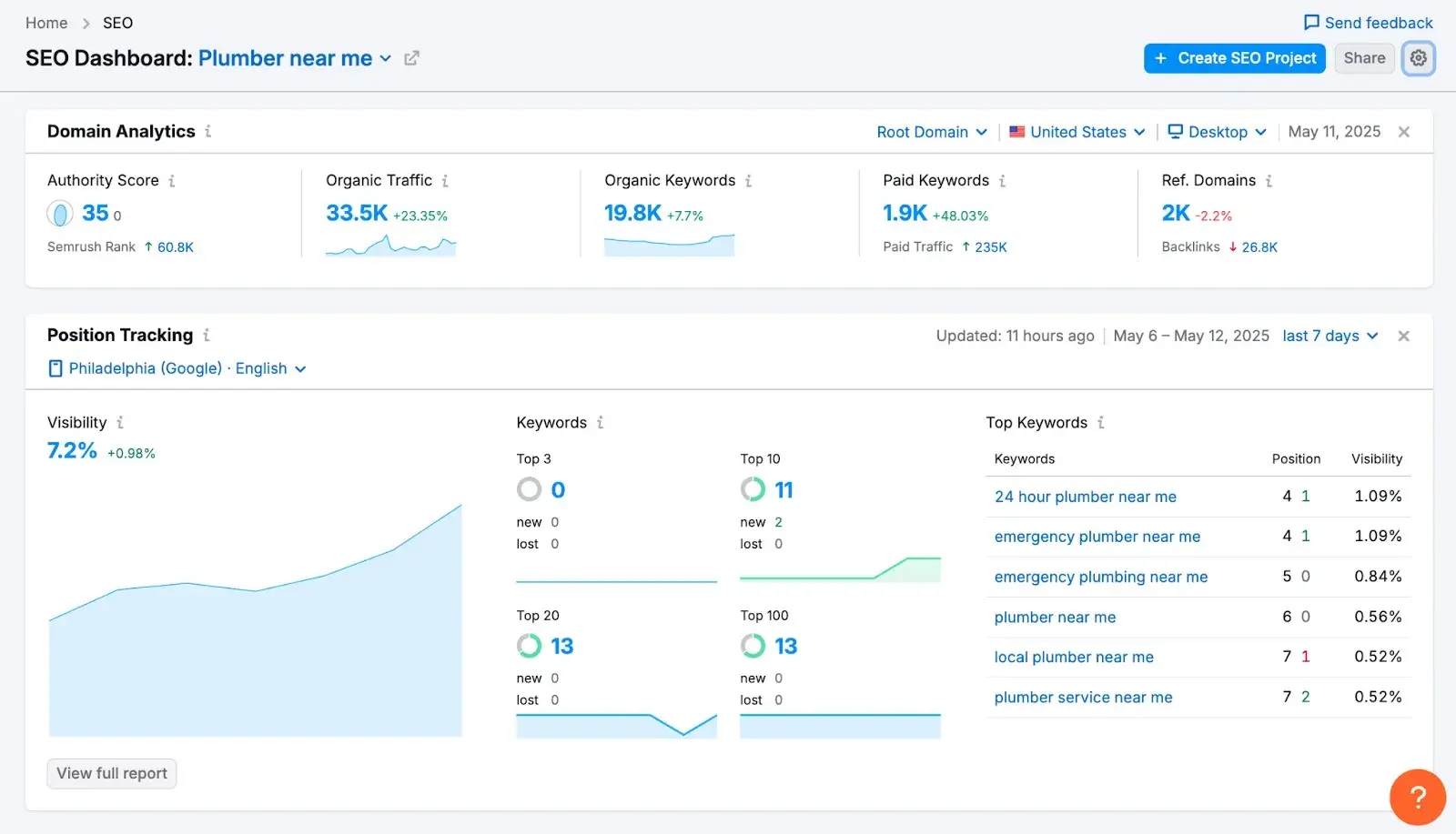
Semrush is used for keyword research, competitor research, and site audits, and remains one of the most comprehensive SaaS SEO platforms for teams that need the full shebang for SEO content, backlinks, technical SEO, and AEO features.
Key Features
- Keyword Magic Tool and competitive research: Surfaces keyword opportunities across the full funnel, maps competitor keyword gaps, and tracks SERP movements over time, giving SaaS teams the intelligence they need to prioritize content investments with confidence. Read more about spying on competitors’ traffic to get the most out of this kind of research.
- Site audit: Crawls the entire domain and surfaces technical SEO issues ranked by severity and impact, from broken links and crawl errors to Core Web Vitals and schema problems with clear guidance on how to resolve each one.
Best for: SaaS marketing teams that need an all-in-one research and auditing platform, spanning keyword strategy, competitive intelligence, and technical site health in a single workspace.
Pricing: Semrush SEO plans start at $117.33/month when billed annually. Teams that need AI visibility features should check Semrush’s current pricing for AI-enhanced plans before publishing, since Semrush now separates classic SEO and AI-enhanced packages.
What we like: I’ve used Semrush for years, and what impresses me most is how consistently it has stayed ahead of the evolution of SEO into AI, adding AI-assisted features like AI visibility. For SaaS businesses in particular, teams can scale subscriptions up or down based on the reports and data they actually need, making it easier to justify costs at different stages of company growth.
8. Ahrefs
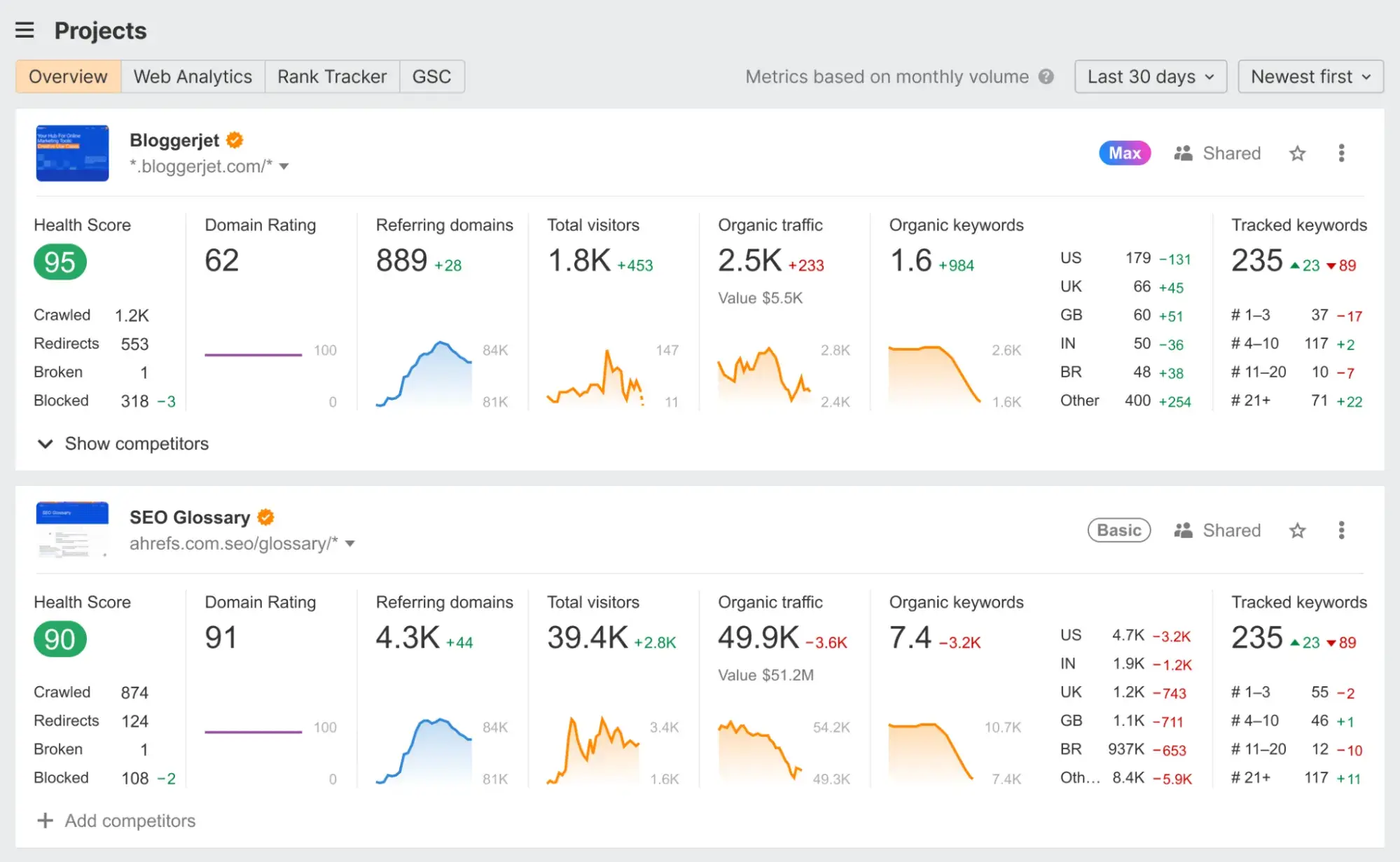
Ahrefs is used for competitor research and backlink analysis, and has long been the tool of choice for SaaS teams that want the deepest possible view of their own and their competitors’ link profiles. Its crawling infrastructure is one of the largest in the industry, making it particularly reliable for accurate backlink data and organic traffic estimates.
Best for: SaaS marketing teams that need keyword strategy, competitive intelligence, and technical site health tools in a single workspace.
Key Features
- Site Explorer and Backlink Analysis: Provides an in-depth view of any domain’s backlink profile, referring domains, anchor text distribution, and link growth over time.
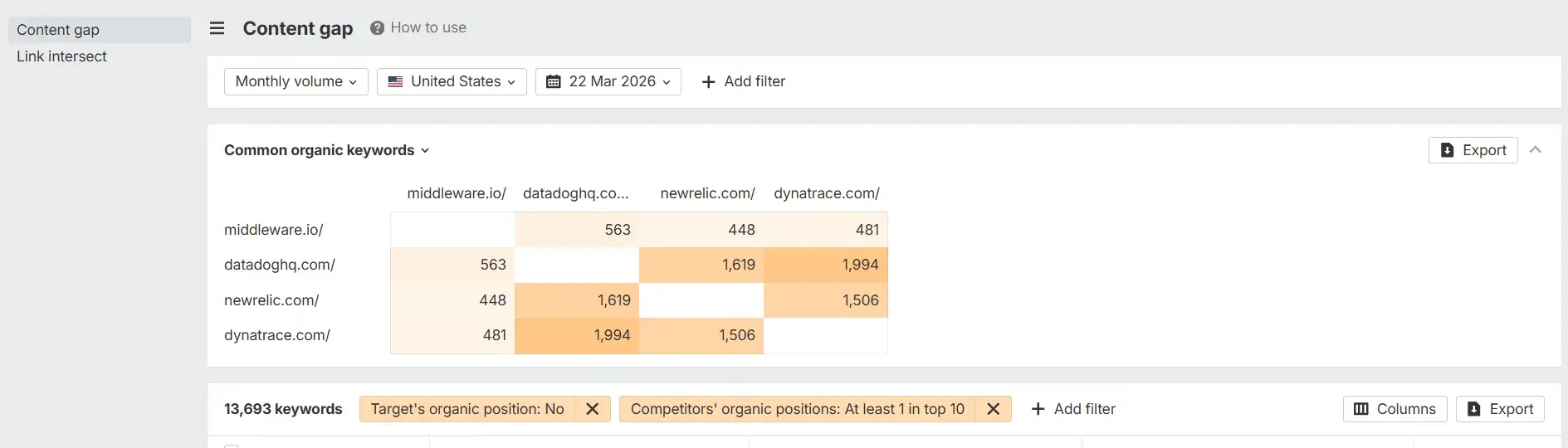
- Content Gap: Compares a domain against multiple competitors simultaneously to surface keywords they rank for that your site doesn’t, helping SaaS teams identify high-priority content opportunities that are already proven to drive traffic in their category.
Pricing: Ahrefs paid plans start with Lite at $129/month, with Standard at $249/month and Advanced at $449/month. Ahrefs also offers limited free access after a paid subscription ends.
What we like: Ahrefs gives SaaS teams a clear view of competitor content performance, backlink profiles, and content gaps. Ila Bandhiya, Senior Digital Marketer at Middleware.io, uses Ahrefs regularly. She says, “Ahrefs provides comprehensive backlink and keyword data, allowing SaaS marketers to identify growth opportunities quickly and efficiently. Its intuitive interface makes complex SEO tasks much more manageable.”
“I particularly like tracking competitor content performance to uncover content gaps and new keyword opportunities for our SaaS product. That directly informs content strategy and helps scale content operations with measurable results,” says Bandhiya.
9. Screaming Frog
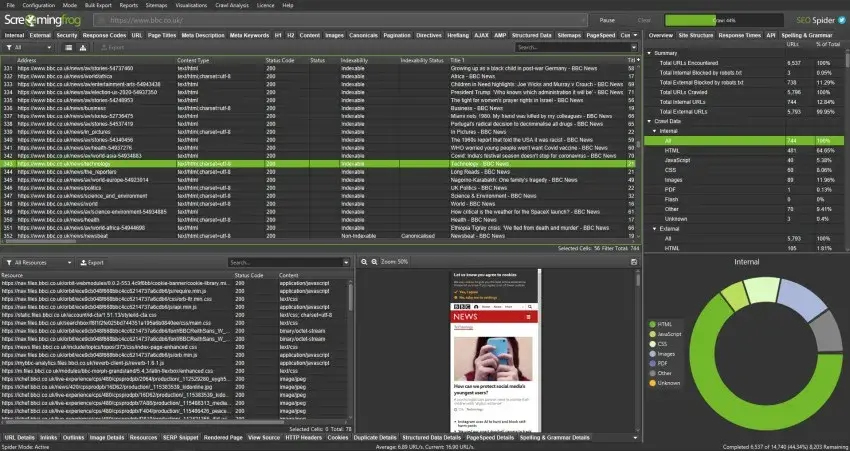
SEO professionals use Screaming Frog for technical crawling and on-site issue discovery, and they widely regard it as the go-to tool for anyone needing a thorough technical audit of a SaaS website. Screaming Frog can crawl every URL it finds and provides raw, unfiltered data to work with.
Key Features
- Full Site Crawler: Crawls an entire website and surfaces technical issues, including broken links, redirect chains, duplicate content, missing metadata, canonicalization errors, and pagination problems, all of which are exportable for a straightforward developer handoff.
- Integration with Google Analytics, Search Console, and PageSpeed Insights: Enriches crawl data with real-world performance metrics, enabling teams to cross-reference technical issues with actual traffic and indexation data for smarter prioritization.
Best for: SaaS developers, technical SEO specialists, and agencies who need deep, granular crawl data to diagnose and resolve site-wide technical issues quickly and accurately.
Pricing: Screaming Frog SEO Spider has a free version with a 500-URL crawl limit. Paid licenses cost $279 per year.
What we like: The price-to-value ratio on Screaming Frog is genuinely hard to beat. For less than the cost of one month on most enterprise SEO platforms, Screaming Frog offers technical crawling capabilities that rival those of tools costing ten times as much. That said, teams need some technical SEO knowledge to interpret Screaming Frog’s reports and prioritize fixes. Unlike other cloud-based tools, such as Sitebulb or Semrush, Screaming Frog doesn’t provide a report that breaks down and categorizes issues in plain English.
10. Google Search Console
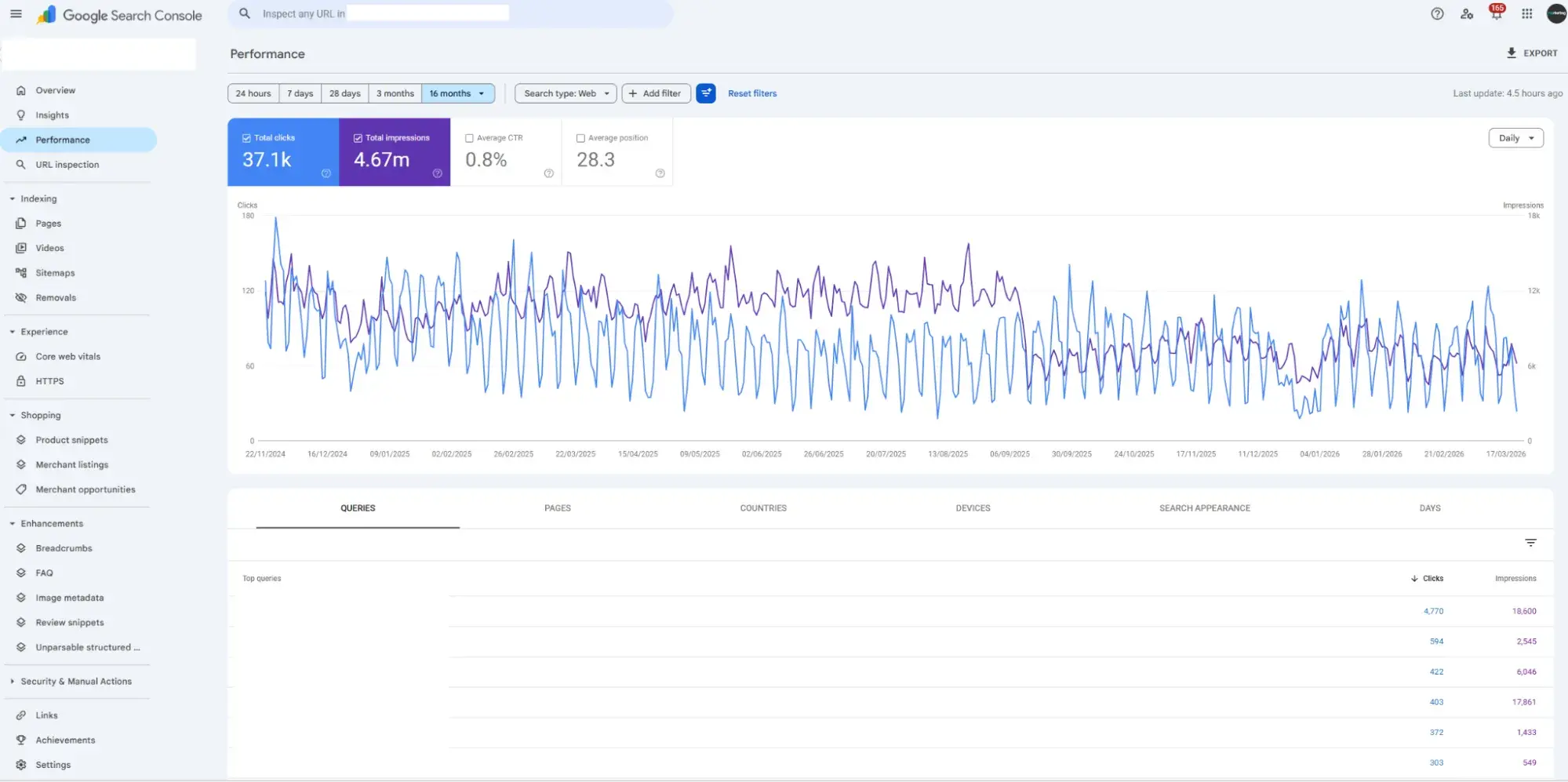
Google Search Console reports search performance and index coverage, and despite being a free tool, it remains one of the most indispensable pieces of any SaaS SEO stack. As the direct line of communication between your website and Google, no third-party tool can replicate the accuracy and authority of the data it provides.
Key Features:
- Performance reporting: Surfaces the exact queries that drive impressions and clicks to your site, broken down by page, device, and country, giving marketers a real-world view of how their content is performing in Google search results, including keyword position tracking over time.
- Index coverage and core web vitals: Flags indexation issues, crawl errors, and page experience signals directly from Google, so users know exactly which pages search engines index, which pages they exclude, and why.
Best for: Every SaaS team, regardless of size or budget. Google Search Console should be the first tool installed in any SEO stack.
Pricing: Free.
What we like: One of the most underrated uses of GSC is keyword research, and I’d argue it’s actually the best starting point before opening any paid tool. Google Search Console shows an SEO specialist the keywords a website already ranks for. Google Search Console also surfaces “zero search volume” keywords, terms that tools like Semrush and Ahrefs don’t even show because their search volume is too low to register. In my experience, those zero SV keywords can be the highest-converting terms a SaaS company has, because they’re so specific to the exact problem a buyer is trying to solve.
11. Bing Webmaster Tools
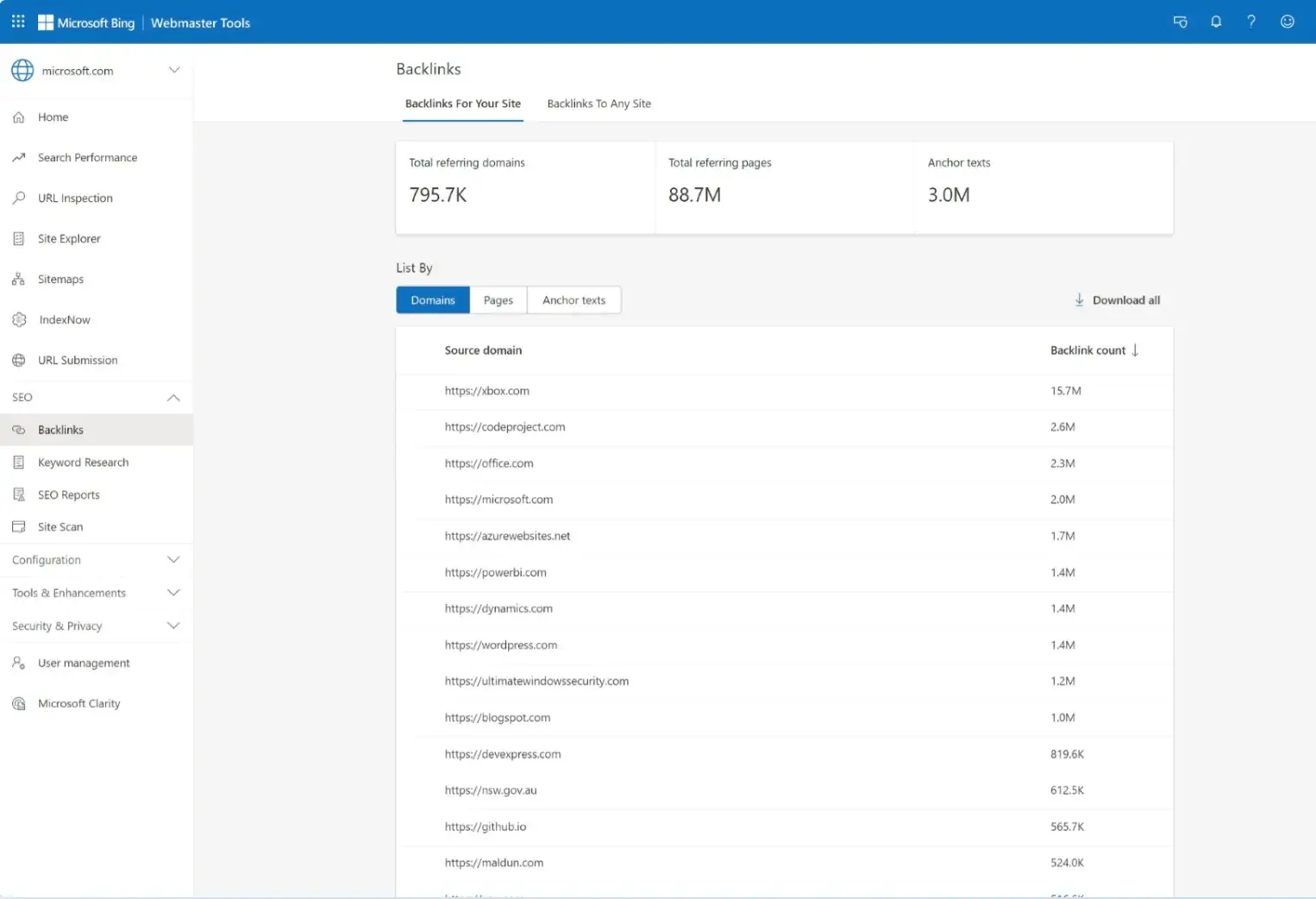
Bing Webmaster Tools supports site monitoring for Bing search. Its recently expanded AI features have made it one of the most interesting free tools available for SaaS teams looking to understand their visibility in AI-generated search results.
Key Features
- Search Performance and Index Monitoring: Tracks impressions, clicks, keyword rankings, and crawl health across Bing.
- AI Performance Dashboard: A new set of insights that shows how your content appears across Microsoft Copilot, AI-generated summaries in Bing, and select partner integrations, including visibility into which URLs generative answers cite and how citation activity changes over time.
Best for: SaaS SEO teams who want to monitor site health and indexation on Bing, and increasingly gain first-party data on how AI-generated answers cite their content.
Pricing: Free.
What we like: Bing Webmaster Tools gives SaaS teams another first-party source for search performance, crawl, and indexation data. It also helps teams monitor how their content appears across Microsoft’s AI search experiences, making it a useful free addition to an AI search visibility workflow.
SaaS SEO Tools For Internal Linking
12. Link Whisper
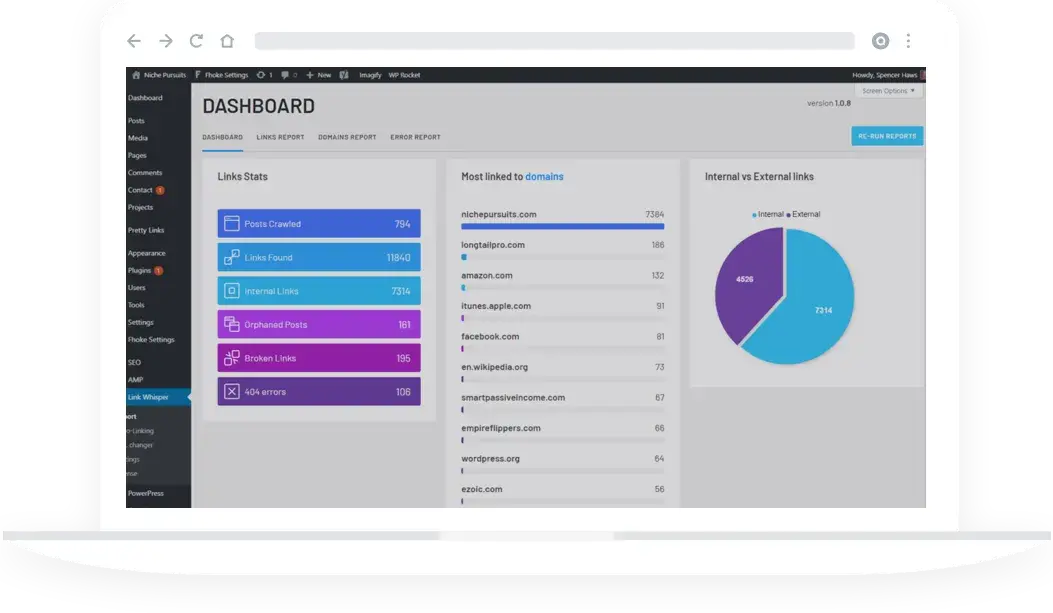
For SaaS sites that have been producing content for any length of time, internal linking is almost always an opportunity. Link Whisper is a WordPress plugin and internal linking tool that automates the most time-consuming part of an internal linking strategy, surfacing relevant link suggestions across existing content so content teams can build a stronger site architecture without manually trawling through hundreds of pages.
Key Features
- Automated Internal Link Suggestions: Scans existing content and suggests contextually relevant internal links in real time as content teams write or edit, flagging orphaned pages and underlinking gaps across your site.
- Link Reporting Dashboard: Provides a site-wide view of internal link distribution, showing which pages have too few inbound links, which are over-linked, and where anchor text diversity could be improved — giving SaaS teams a clear picture of site architecture health at a glance.
Best for: SaaS teams running WordPress sites that need faster internal link suggestions, orphaned page detection, and internal link reporting.
Pricing: Link Whisper is billed annually, with plans starting at $97/year.
What we like: Link Whisper makes internal linking easier by surfacing orphaned pages, enabling bulk URL updates, and offering link recommendations in a single workflow. On most SaaS sites I’ve audited, a surprising number of high-quality pages have zero or one internal link pointing to them, which means Google rarely finds or prioritizes them, regardless of how good the content is. Link Whisper makes fixing that fast, which is one of those quick wins that can move rankings without publishing a single new piece of content.
13. Yoast SEO
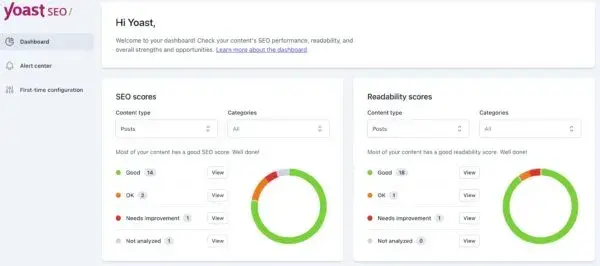
For SaaS teams running their content hub or blog on WordPress, Yoast SEO provides a reliable foundation for on-page SEO and internal linking without requiring technical expertise.
The plugin scans your existing content and recommends relevant pages to link to during writing stages, helping teams build a stronger site architecture over time without a separate tool. For SaaS sites with extensive blog archives, this is a low-effort way to improve the distribution of link equity and reduce orphaned pages that quietly drag down overall site performance.
Unlike Link Whisper, Yoast also assists with other SEO tactics, such as on-page optimization, schema, sitemaps, and more.
Key Features
- On-Page SEO and Readability Analysis: Scores each page against your target keyword in real time, flagging issues with metadata, heading structure, keyword distribution, and content readability — giving writers clear, actionable guidance at the point of creation.
- Internal Linking Suggestions: Recommends relevant existing content to link to during writing, helping SaaS teams build consistent internal link coverage across their content library without manual cross-referencing.
Best for: SaaS teams on WordPress who want a reliable, easy-to-use plugin that covers on-page SEO fundamentals, metadata management, and basic internal linking suggestions in a single lightweight install.
Pricing: The free version covers core on-page SEO functionality. Yoast SEO Premium costs $9.90/month, billed annually at $118.80, excluding VAT.
What we like: Yoast handles metadata, redirects, and on-page guidance all in one plugin, which means one less tool to manage in an already complex stack.
SaaS SEO Tool Stack by Team Size
Not every SaaS team needs every tool on this list. The right stack depends on a team’s headcount, budget, and content output goals.
Here’s how to think about building your stack as your team grows.
| Tool |
Solo to 2 |
Team of 3–5 |
Team of 10+ |
| Marketing Hub |
✔ |
✔ |
✔ |
| Content Hub |
✔ |
✔ |
✔ |
| HubSpot AEO Grader |
✔ |
✔ |
✔ |
| Google Search Console |
✔ |
✔ |
✔ |
| Bing Webmaster Tools |
✔ |
✔ |
✔ |
| Semrush |
✔ |
✔ |
✔ |
| Ahrefs |
— |
— |
✔ |
| Screaming Frog |
— |
✔ |
✔ |
| Surfer SEO |
✔ |
✔ |
✔ |
| Clearscope |
— |
— |
✔ |
| Enfra Chrome Extension |
✔ |
✔ |
✔ |
| Link Whisper |
— |
✔ |
✔ |
| Yoast SEO Premium |
— |
— |
✔ |
Solo to 2 Marketers
A solo marketer or a two-person SaaS team should prioritize free first-party data, a single core optimization workflow, and a single way to connect SEO activity to business outcomes.
- Start with: Google Search Console, Bing Webmaster Tools, and HubSpot AEO Grader.
- Add next: Content Hub or Marketing Hub, depending on whether the team needs publishing support, CRM attribution, or both.
- Use selectively: Surfer SEO or Clearscope for briefs and on-page optimization when the team starts publishing consistently.
Team of 3 to 5
A small SaaS marketing team usually needs more structure around research, briefs, publishing, optimization, internal linking, and reporting.
- Start with: Marketing Hub, Content Hub, Google Search Console, Bing Webmaster Tools, and HubSpot AEO Grader.
- Add next: Semrush or Ahrefs for keyword research, competitor analysis, and technical auditing.
- Use selectively: Surfer SEO or Clearscope for content optimization, plus Screaming Frog for deeper technical checks.
Team of 10+
A larger SaaS team needs a shared SEO system that supports multiple contributors, clearer reporting, and more frequent technical and content refresh cycles.
- Start with: Marketing Hub, Content Hub, Google Search Console, Bing Webmaster Tools, and HubSpot AEO Grader.
- Add next: Semrush, Ahrefs, Screaming Frog, and a dedicated content optimization tool like Surfer SEO or Clearscope.
- Use selectively: Link Whisper or Yoast SEO if the site runs on WordPress, plus Enfra if the team uses AI tools heavily during content planning and editing.
Frequently Asked Questions About SaaS SEO Tools
What’s the best way to track AI search visibility for a SaaS brand?
Start with HubSpot AEO Grader to get a snapshot of how ChatGPT, Perplexity, and Gemini represent your SaaS brand. The tool helps teams identify whether AI engines mention the brand, how they describe it, and how that visibility compares with competitors.
For ongoing tracking, pair AEO reporting with Bing Webmaster Tools’ AI Performance dashboard and traditional SEO data from Google Search Console. Together, those tools help SaaS teams understand both search visibility and AI citation activity.
How should a small SaaS team prioritize SEO tools on a tight budget?
Search Console, Bing Webmaster Tools, and AEO Grader are all free SaaS SEO tools that provide more accurate data. From there, Marketing Hub provides SEO, CRM, and reporting in one platform, which is a far more efficient investment than stitching together multiple point tools.
Which SaaS SEO tools integrate best with a CRM for attribution?
Marketing Hub is the strongest option for CRM-connected SEO reporting because its SEO tools connect with HubSpot Smart CRM, allowing marketing to attribute organic traffic directly to contacts, deals, and closed revenue without any custom integration.
How often should a SaaS company refresh high‑intent content?
Review high-intent pages, such as comparisons, alternative pages, and bottom-of-funnel category terms, at least every 3 to 6 months, as competitor content and SERP features in these categories shift frequently.
Do I need both a content optimizer and a brief generator?
Not necessarily at the start. Tools like Surfer SEO handle both brief generation and on-page optimization, making one tool a practical investment for smaller teams.
Larger SaaS teams may eventually split those jobs across dedicated tools when they need more detailed briefs, separate editorial workflows, or stronger content governance.
The right SaaS SEO tools make the difference between guessing and growing.
The tools in this guide span every stage of a modern SaaS content operation. A SaaS content engine includes stages of research, briefs, creation, optimization, refresh, internal linking, and reporting, and the right stack ensures data, not guesswork, supports each stage.
If there’s one place I’d encourage SaaS teams to start, it’s HubSpot. Marketing Hub connects SEO work to CRM attribution, Content Hub brings SEO guidance into the content workflow, and HubSpot AEO Grader helps teams understand how AI engines represent their brand. When SEO data sits alongside contact, pipeline, and content performance data, SEO becomes easier to connect to revenue. In my experience, that shift matters more than adding another point tool to the stack.
