
At its core, an SEO audit is a step-by-step review of your website’s technical health, content quality, and search visibility. An SEO audit identifies technical, on-page, content, and link issues on a website. It helps SEO teams identify, prioritize, and fix the issues that block traffic, rankings, and, importantly, conversions. Businesses and SEO teams should create audits to identify opportunities that advance business goals and growth.
![→ Download Now: SEO Starter Pack [Free Kit]](https://no-cache.hubspot.com/cta/default/53/1d7211ac-7b1b-4405-b940-54b8acedb26e.png)
A modern audit goes beyond identifying issues that further traditional blue-check rankings in Google Search. With AI search reshaping how users discover brands, marketers now need to evaluate entity signals, brand visibility in AI answers, and how well their content performs in generative engines.
In this guide, you’ll learn how to run an SEO audit that’s helpful in today’s search landscape. I’ve included clear steps, examples, and an SEO audit checklist to help SEO professionals at any skill level drive measurable traffic growth.
Table of Contents
- What is an SEO audit and why does it matter?
- SEO Audit Checklist for Quick Wins
- How to Run an SEO Audit Step-by-Step
- How to Interpret Your SEO Report and Prioritize Fixes
- Tools to Run an SEO Audit
- Frequently Asked Questions About SEO Audits
- Modern SEO audits go beyond blue links.
What is an SEO audit and why does it matter?
An SEO audit is a structured review of your website. SEO specialists conduct audits at regular intervals, such as quarterly or yearly. Sometimes third-party consultants conduct site audits to bring a fresh set of eyes to the project.
The audit identifies the issues preventing your pages from ranking, being crawled, or converting. Then, the SEO strategist turns audit findings into a prioritized plan that directly supports traffic growth, lead generation, and pipeline.
Typically, an audit includes:
| Audit Area |
What It Covers |
| Technical health |
Crawlability, indexability, page speed, Core Web Vitals, structured data, and site architecture. |
| On-page SEO |
Metadata, headings, internal linking, URL structure, and topic and keyword clusters. |
| Content quality + depth |
E-E-A-T signals, topical authority, freshness, duplication, thin pages, and content gaps. |
| Top-performing pages |
Pages generating the most traffic or impressions, with opportunities to improve CTR and rankings. |
| Revenue-generating pages |
Product, service, or conversion pages with the highest commercial impact and what’s blocking them from ranking higher. |
| Highest-conversion pages |
Pages that convert well and can be scaled, replicated, or improved further. |
| CRO recommendations |
Layout friction, UX issues, unclear CTAs, messaging clarity, and engagement metrics. |
| Backlink profile & gaps |
Authority, toxic links, and opportunities to earn links your competitors rely on. |
| Brand and entity signals |
How clearly your brand is understood and categorized by search engines and AI models. |
| AI search visibility |
How your site appears in AI-generated answers using tools like HubSpot’s AEO Grader. |
SEO Audit Checklist for Quick Wins
Conducting an SEO audit can feel overwhelming, even for experienced marketers. At a minimum, an SEO audit checklist includes crawlability, indexability, page speed, on-page SEO, content quality, technical SEO, and backlinks.
A good SEO audit will surface hundreds of insights, and in-house teams often find themselves swimming in data without knowing where to start. Quick wins help cut through the noise. Spotting these early gives teams momentum and makes the rest of the audit far easier to interpret.
Here are high-impact, low-effort opportunities SEO specialists should look out for as they move through the audit checklist (the step-by-step audit guide is coming next):
- Content audit. Identify thin or outdated pages. Nearly every site has blogs that share trends or content that is completely irrelevant now. For example, “Wedding Trends in 2002” or content about services the business no longer offers. These pages almost always have close to zero clicks and can nearly always be removed. Look at HubSpot’s article Why We Removed 3,000 Pieces of Outdated Content From the HubSpot Blog. It’s genuinely brilliant and provides the thought process and rationale for their decision.
- Technical audit. Look for critical blockers, such as noindex tags, 404 pages, broken links, redirect chains, and slow-loading pages. Use Screaming Frog or HubSpot to identify all of these (there’s a section about tools later). Alongside the heavy-hitting technical issues, complete any task that takes less than 30 minutes to clear a bunch of problems fast. Sometimes momentum inspires further action.
- Image compression and lazy loading. Reducing image weight is a fast way to improve page speed without developer support. Image compression and lazy loading are highly recommended to improve website performance.
- Broken UX or CTA elements. Fix friction points that hurt conversions, such as broken forms, unclear calls-to-action (CTAs), or mobile layout issues.
- Local SEO audit. Check that your Google Business Profile is up to date, ensure NAP (name, address, phone number) consistency, and look for duplicate listings or missing local citations. Resolve any of these issues. NAP consistency is especially important because AI tools summarize data. Inconsistencies may reduce the likelihood of a citation or lead to incorrect citations.
- Metadata improvements. Spot missing or weak title tags. These are fast fixes that often lift CTR immediately. I recently improved my client’s click-through rate just by adding a site favicon and optimizing the title tags. The title tag edits meant other, more relevant pages ranked higher (instead of their homepage), and therefore, people clicked more.
- Internal linking opportunities. Add contextual links pointing to your most important pages, especially those that drive conversions or support key topics. Identify orphan pages and work to reduce them to zero; many can be deleted, consolidated, or deindexed. Orphan pages are often a trove of audience and content insights; marketers create them with the best intentions (usually to close deals), then forget about them. An internal linking sweep helps resurface these pages, strengthen your site architecture, and direct authority where it actually matters. Or, orphan pages can inspire improved campaigns.
- Duplicate or cannibalizing pages. Identify pages competing for the same keyword and consolidate them for a cleaner, stronger ranking signal.
- Schema audit. Check for missing or incorrectly structured data on key templates (articles, products, FAQs). Proper schema helps search engines understand your content and can unlock rich results.
- Low-hanging content refreshes. Update pages with high impressions but low clicks — a few strategic improvements can unlock quick traffic wins.
- Backlink gap analysis. Compare your domain authority and backlink profile to competitors. Quick wins often include reclaiming unlinked brand mentions or refreshing link-worthy assets. This matters for both SEO and AEO/GEO. AI search engines lean on strong authority and brand mentions when choosing which sites to cite in generated answers. If competitors earn better links from trusted, authoritative sources, see if your business can earn the same.
Noticing a significant gap in your competitors’ backlinks compared to yours?
Watch this video and learn how to get more high-quality links:
How to Run an SEO Audit Step-by-Step
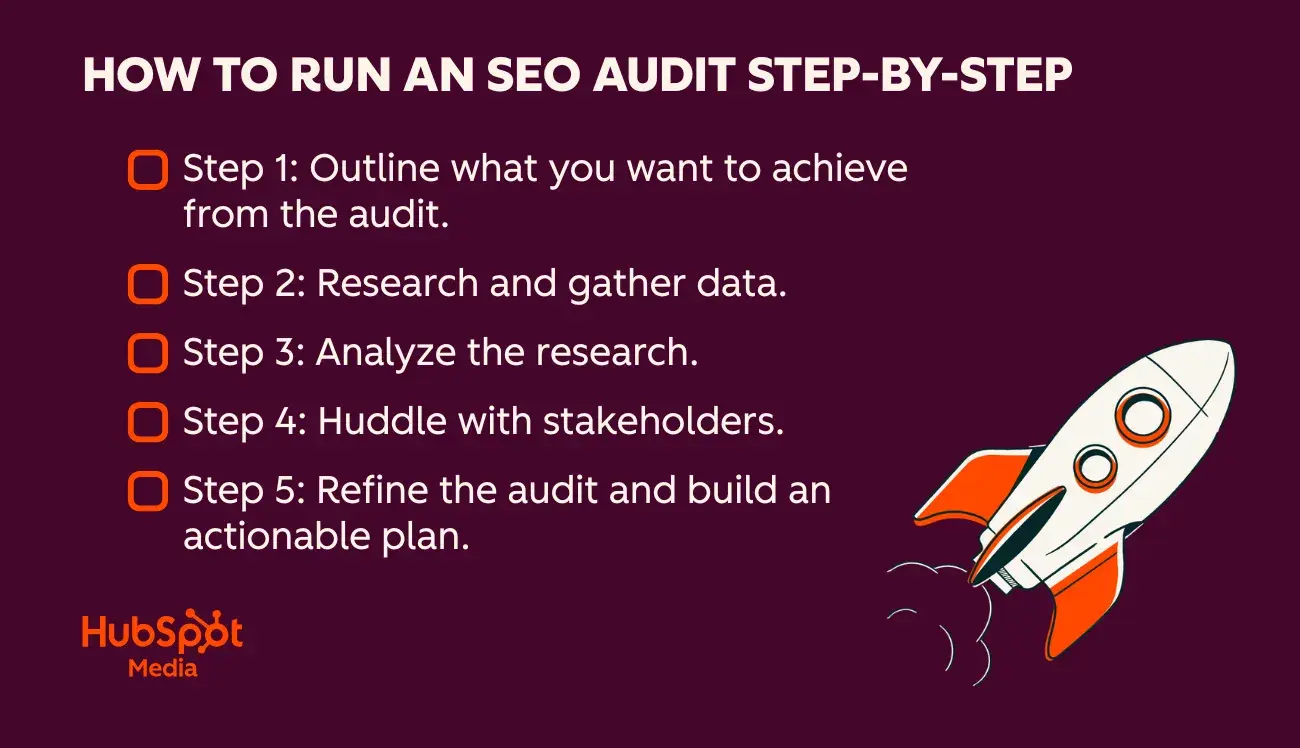
An effective SEO audit follows a straightforward process, from setting intent to translating data into strategic action.
Here’s a simple five-step framework I use with clients to stay focused.
Important: Although I’m calling this an “SEO audit,” it should always include AEO (Answer Engine Optimization) and GEO (Generative Engine Optimization) to reflect how people discover brands today.
Step 1: Outline what the business wants to achieve from the audit.
Defining the purpose of your audit means getting crystal clear on why you’re doing it and what problem(s) you’re trying to solve. Every audit should start with business goals, not just a list of technical checks, and every SEO audit improves website traffic and conversions. Still, SEO consultants or SEO team members creating the audit should ask what the underlying issue is and focus efforts on the pages, templates, and metrics that matter most.
How to do it:
- Talk to stakeholders and ask: What triggered the need for an audit?
- Identify whether the problem is traffic loss, declining conversions, falling rankings, poor AI visibility, or a push into a new market/topic.
- Map the issue to specific pages, funnels, or content clusters.
- Document what success looks like (e.g., “recover 20% of lost traffic,” “improve AI answer visibility for X topic,” “increase conversions on high-intent pages”).
- Set the audit’s boundaries so you don’t end up analyzing the entire site without direction.
Note: An audit is a good practice; sometimes its purpose is to enable SEO specialists to step back and view the site with a fresh set of eyes. But as a best practice, each scheduled audit should have a purpose or goal.
Before I pull any data, I clarify what the business wants to solve. If a client tells me they’ve lost traffic, conversions have dropped, or a new product isn’t ranking, I shape my audit around that problem. This gives me a clear roadmap. I know which pages matter most and which elements or metrics deserve the closest attention. That doesn’t mean I ignore everything else. My rule is simple: Anything I come across goes into the audit document. There’s no need to gatekeep findings because the person running the audit prioritizes them later.
Step 2: Research and gather data.
Research and data gathering is the phase in which SEO specialists collect all quantitative signals that show how your site is performing. It’s the foundational layer of any SEO audit.
You might pull:
- Rankings
- Traffic trends
- Technical errors
- Backlink data
- Content performance
- AI visibility metrics
Pull all the data into one place, like a Google Sheet.
Pro tip: Keep this information stored safely, as it also serves as a benchmark for your next audit. All being well, the next audit should demonstrate an increase in metrics such as rankings, traffic, and AI visibility.
How to do it:
- Pull data from core platforms, such as Google Search Console, Google Analytics, your CMS, crawl tools, backlink tools, and AI visibility tools.
- Export everything into Sheets or Excel and use conditional formatting to help analyze it.
- Set up conditional formatting to highlight anomalies (e.g., pages with high impressions but low click-through rates, URLs with 404 errors, slow Core Web Vitals, orphan pages, thin content, redirects).
- Collect data on competitors: ranking keywords, backlink gaps, content performance, and AI search visibility.
- Organize your tabs by theme — technical, content, on-page, backlinks, local, AI — so patterns start to emerge.
At this stage, I’m gathering everything — exports from crawlers, GSC, analytics, and backlink tools. This is what I call the “cookie-cutter SEO” phase: The tools do most of the heavy lifting, and anyone can technically do it. I move all the data into sheets, set up conditional formatting, and highlight anything unusual. I’m not trying to solve anything yet; I’m simply collecting and quietly analyzing the raw material.
Step 3: Analyze the research.
Human analysis is where the raw data becomes insight. This is the strategic layer of the audit; the part that tools can’t do for you. A sophisticated SEO reads between the lines, connects patterns, and understands why the issues exist and how they impact traffic, rankings, conversions, and AI visibility. It’s where the audit stops being a spreadsheet exercise and starts becoming a roadmap.
How to do it:
- Interpret the patterns in your data: drops, spikes, plateaus, and anomalies.
- Identify causes, not just symptoms — for example, whether a ranking drop is due to algorithm changes, content quality, technical regressions, or stronger competitors.
- Connect your findings to user behavior — where people land, where they bounce, what content they trust, and what pages they convert on.
- Evaluate how the site performs across traditional SEO and AEO/GEO — entity clarity, topical authority, and how well the brand is referenced in AI outputs.
- Start grouping findings by theme (technical, content, on-page, authority) and by impact.
- Determine which insights actually move the needle and which simply clutter the audit.
What’s critical: Align SEO insights with your business strategy — product priorities, revenue-driving pages, seasonal demand, campaigns, and sales goals. Refer back to the team’s notes and comments from step one.
During this stage, I start forming ideas about where we could take the site. For example, if a brand has told me they’re interested in reaching a specific audience, I quietly spot opportunities to do so and record all insights in a spreadsheet.
Then, even though I have a clear direction from the client in step one, I like to meet again in step four. By then, we can review the SEO data and determine whether priorities or goals need to change. Sometimes the data aligns fully with what the client said in phase one; if so, a quick confirmation is helpful before I dive into creating the plan.
Step 4: Huddle with stakeholders.
This phase is where your SEO insights meet the realities of the business. At this stage, SEO specialists can work with stakeholders to ensure the recommendations make sense in the broader context of strategy, priorities, capacity, and upcoming campaigns. This step validates your assumptions, fills in knowledge gaps, and ensures the audit isn’t happening in a vacuum.
Sometimes, reviewing the site through the lens of an SEO audit uncovers new insights that need discussion. For example, identify an untapped audience segment, a high-potential content cluster, or a topic area that wasn’t mentioned in step one but could significantly benefit the business. This is the moment to bring those findings to the table and realign on what truly matters moving forward.
How to do it:
- Share a summary of key findings rather than the full spreadsheet. Stakeholders don’t need to see all the workings out (well, unless they really want to!). Focus on themes and patterns.
- Ask stakeholders to validate context: upcoming product launches, resourcing limitations, sales feedback, seasonal trends, or known technical constraints.
- Confirm the importance of the high-impact pages you’ve identified. Some may no longer be strategic priorities. Others might benefit from other resources, like ads or social media, to make them aware of what’s coming their way.
- Discuss any surprises the audit surfaced — traffic drops, content gaps, missing schema, or AI visibility issues.
- Align on what success looks like — which goals matter most and what timelines are realistic.
Identify owners early (SEO, content, developers, product, design) so there’s clarity on who will handle each recommendation.
Important: When you get to this stage, you’ve likely got a pretty solid idea of where you want to take your strategy. Get stakeholder buy-in before creating it.
This is one of my favorite phases of the SEO audit checklist. As a consultant, in step one, I’m a passive listener to how the website performs. In this stage, I know what’s going on. I’m excited about the project and have my own insights. This meeting has more energy, and more insights are unlocked. When data supports ideas, it’s encouraging, exciting, and motivating.
Step 5: Refine the audit and build an actionable plan.
This is the moment where your findings become a real strategy. After aligning with stakeholders, refine the audit into a clear, prioritized plan that the business can actually execute.
It’s not enough to list issues. The value of an audit lies in translating insights into structured actions, with owners, timelines, and expected outcomes.
This step turns the audit from a diagnostic into an actionable roadmap.
How to do it:
- Revisit all findings and filter out anything low-impact or non-actionable.
- Prioritize recommendations using a simple framework like impact vs. effort or “now / next / later.”
- Combine related issues into themes or projects (e.g., “content refresh sprint,” “template cleanup,” “AI visibility improvements”).
- Assign owners to each item: SEO, dev, content, design, product. Accountability is so important for completing actions.
- Add estimated effort and dependencies to help teams plan realistically.
- Tie each recommendation back to the business goals identified in steps one or four.
- Create a clear, digestible roadmap: what to fix first, what will drive revenue or visibility, and what can be parked for later.
- Provide optional “quick wins” lists to help teams build momentum early.
A well-structured plan makes the audit usable, something the business can act on week by week, rather than a document that gets filed away.
I want my audits to be so actionable that anyone could take the document and run with it, feeling confident to implement it. I assign owners, estimate effort, and rank recommendations by impact so the team knows exactly where to start. This is the step where the audit stops being a list of interesting insights and becomes a clear, focused execution plan that actually drives results. If I’m working with the business long term on implementation, I take the audit and manage the actions in a project management tool like Asana.
How to Interpret Your SEO Report and Prioritize Fixes
SEO specialists should prioritize audit findings by impact, effort, and owner. Interpreting the SEO audit is where the real impact happens. Once the SEO team has collected its findings, the next step is turning them into a clear, prioritized plan that the business can act on. Here’s how to evaluate what matters most and where to start.
Here are some ways to interpret the SEO report, in the order I’d prioritize:
Prioritize fixes that unblock crawling and indexing.
Anything preventing search engines from crawling or indexing key pages should rise to the top of the priority list. These issues, such as accidental noindex tags, broken internal links, or faulty robots.txt rules, can instantly suppress visibility.
Fixing them often delivers the fastest and most noticeable traffic lift.
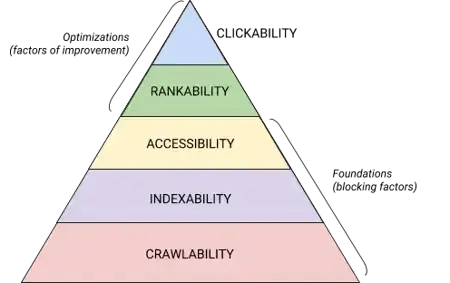
These five categories (crawlability, indexability, accessibility, rankability, and clickability) and how they stack within the technical SEO hierarchy are best shown in this graphic, which echoes Maslow’s Hierarchy of Needs but reimagined for search engine optimization.
Flag issues with true business risk.
Some findings need immediate attention, not for SEO reasons, but for revenue or reputation reasons. Security vulnerabilities, broken checkout flows, incorrect pricing pages, or inaccessible and broken forms should be treated as non-negotiable priorities. These directly affect conversions and trust.
Align tasks with business goals.
SEO specialists should prioritize the content clusters and pages that support the company’s specific goals, whether that is targeting a new audience, promoting a key product, or expanding into a new region.
An SEO audit should always reflect the business’s direction.
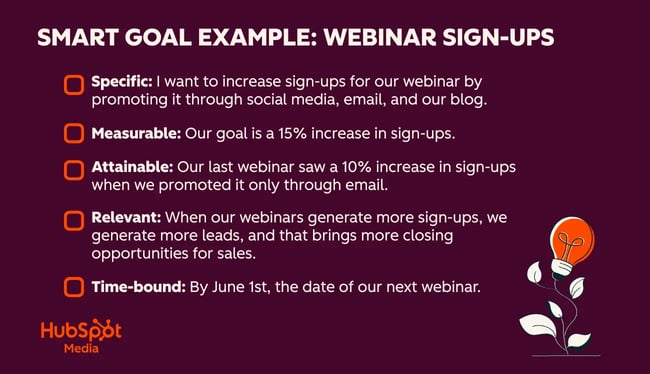
Pro tip: Ask stakeholders for SMART goals, so they’re specific, measurable, attainable, relevant, and time-bound. The graphic below shows what SMART goals look like.
Identify content updates that support multiple channels.
Prioritize content that does more than rank. Pages that support SEO, email nurturing, sales enablement, or product education create compounding value. One high-quality asset can close gaps across multiple touchpoints, especially when tied to a defined content cluster or campaign. HubSpot’s free AI content writer can help with this step.
Tackle high-impact, low-effort wins first.
Look for actions that take less than 30 minutes and deliver measurable improvements.
Updating a title tag or adding a favicon can make a big difference. Sometimes, it’s all that’s needed to move the needle, and if that’s the case, just get it done.
Adding a few internal links, compressing images, or deleting an irrelevant, outdated page can get actionable work moving and build momentum early in the process.
Pro tip: Celebrate the little wins, especially if other departments, like developers, are working on the project. A bit of positivity is motivating, and these small fiddly tasks are surprisingly impactful. The goal? Get the team motivated to complete the work.
Cluster recommendations into sprints.
Group related issues so teams can work efficiently. A “page speed sprint,” “schema sprint,” or “content refresh sprint” helps teams stay focused and reduces context switching.
This makes implementation smoother and helps deliver improvements faster.
Plus, you can report on that particular sprint as soon as it’s done and show everyone the fruits of their labor.
Focus developer time on sitewide, template-level issues.
Developer resources are usually limited, so use them wisely. Prioritize fixes that affect the entire site: template-level speed issues, schema improvements, navigation changes, or structural improvements. These updates can influence hundreds or thousands of URLs at once.
Pro tip: Want to upscale your SEO skills? HubSpot Academy’s SEO Course will help teams learn the skills needed to do SEO work that drives results.
Tools to Run an SEO Audit
The right tools make your audit faster, more accurate, and far easier to prioritize. Below are the tools I use most often.
HubSpot AI Grader
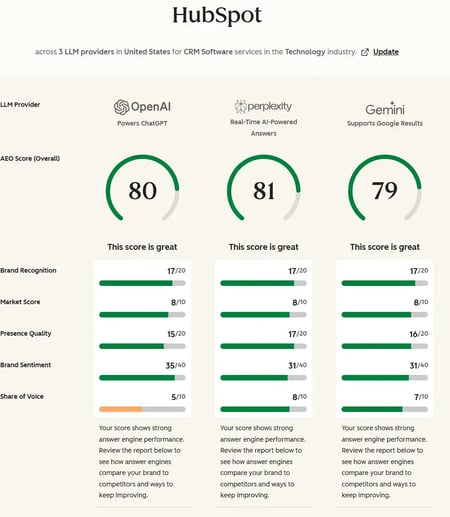
HubSpot’s AEO Grader is one of the best tools for an SEO audit with AI insights. AI search grader assesses brand and entity visibility in AI search results. It evaluates how well your brand appears in AI search results, including generative engines, answer boxes, and conversational interfaces. This aligns directly with the AEO/GEO components highlighted throughout this article: entity clarity, authority signals, and brand visibility are now essential parts of a complete audit.
What it is: HubSpot’s AEO Grader is a free tool that analyzes your site’s AEO (Answer Engine Optimization) and GEO (Generative Engine Optimization) readiness.
Why it matters: Traditional SEO audits don’t tell how AI systems interpret your brand. The AEO Grader does. It evaluates entity strength, content signals, structured data, and authority markers, all of which heavily influence whether your brand appears in AI-generated responses.
Best for: HubSpot’s AEO Grader is best for marketers ready to move beyond classic rankings and understand how AI search systems perceive their site.
Pricing: Free
Read more about AEO in this comprehensive guide.
HubSpot Website Grader
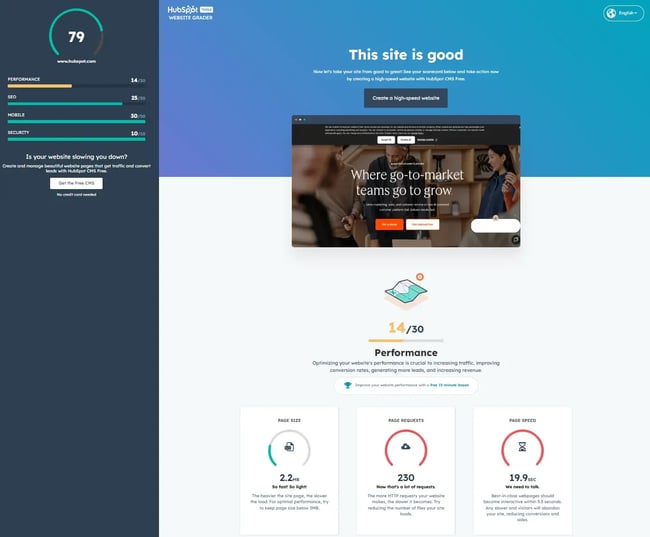
HubSpot’s Website Grader is one of the simplest ways to get a quick snapshot of your site’s SEO health. Marketers can use free tools like Website Grader to start an SEO audit; it aligns perfectly with the “quick wins” section of this article. The tool surfaces issues around speed, metadata, and basic technical hygiene that can be fixed early in the audit process.
What it is: HubSpot Website Grader is a free tool that evaluates your website’s SEO, performance, mobile usability, and security.
Why it matters: HubSpot Website Grader provides a quick, easy-to-understand entry point into your audit before you dive into deeper technical or competitive analysis. It’s beneficial for spotting fast fixes that take under 30 minutes.
Best for: HubSpot Website Grader is best for marketers who want a simple, high-level snapshot before pulling data from heavier tools.
Pricing: Free
Semrush
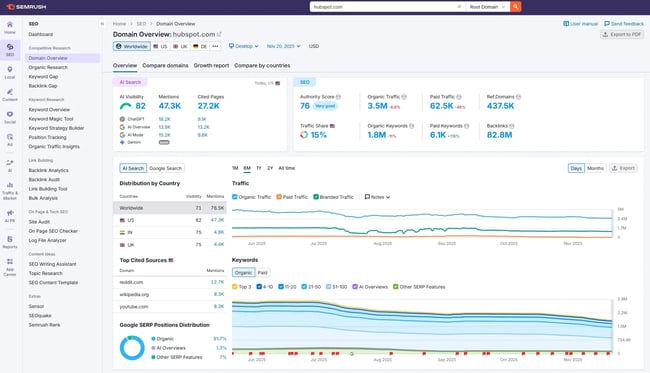
Semrush is one of the most comprehensive SEO platforms on the market. I’ve used it for over 10 years. As mentioned earlier in this article, it continues to excel at keyword research, content insights, competitive tracking, and now AI/LLM-driven recommendations.
What it does: A complete SEO toolkit covering keyword research, competitive analysis, backlink auditing, content insights, site audits, and AI search intelligence.
Best for: Marketers or consultants who want deep keyword data, competitor insights, and robust reporting.
Pricing: Plans start at $165/month billed annually.
Screaming Frog
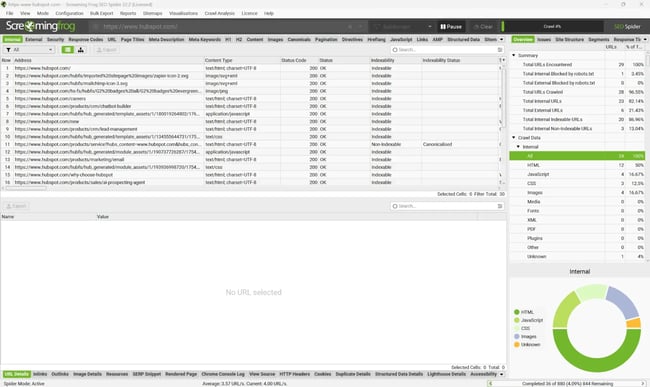
Screaming Frog is a must-have for technical audits, especially when you’re working through issues like orphan pages, broken links, redirect chains, thin content, or missing metadata.
What it does: A fast, locally installed crawler that scans your website and reveals all major technical issues.
Best for: Technical SEOs or marketers who want precise, crawl-based insights. To use this tool, you must know how to derive insight from your data. Unlike the HubSpot tools listed here, it doesn’t provide insights.
Pricing: Free version, plus licensed version for $279/year.
HubSpot’s Marketing and Content Hub
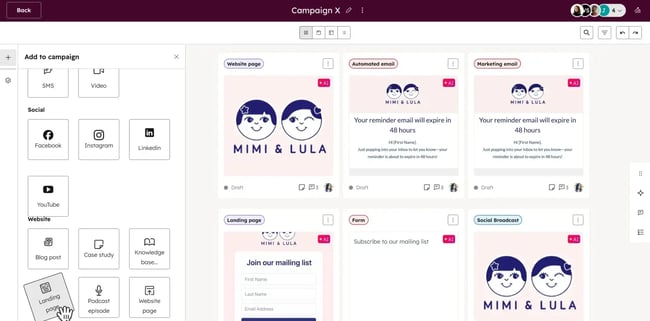
Used together, HubSpot’s Marketing Hub and Content Hub make marketers unstoppable.
HubSpot Content Hub combines content management with built-in SEO intelligence, making it perfect for implementing many of the opportunities uncovered in an SEO audit, especially those related to metadata, content quality, or outdated content.
What it is: HubSpot’s Content Hub is a CMS with AI-powered SEO recommendations, content suggestions, and intelligent content tools that support editorial and technical improvements.
Why it matters: Content Hub helps optimize metadata, improve on-page signals, and manage content clusters.
Pro tip: SEO specialists and writers who use Breeze AI within Content Hub are automating content production.
HubSpot Marketing Hub includes SEO tools that are directly connected to your website data, content strategy, and reporting, making it easier to find actions and implement the roadmap created in Step 5 of your audit.
What it is: HubSpot’s Marketing Hub is a comprehensive marketing platform that includes SEO recommendations, content optimization tools, analytics, and reporting.
Here’s a screenshot from Marketing Hub’s SEO report.
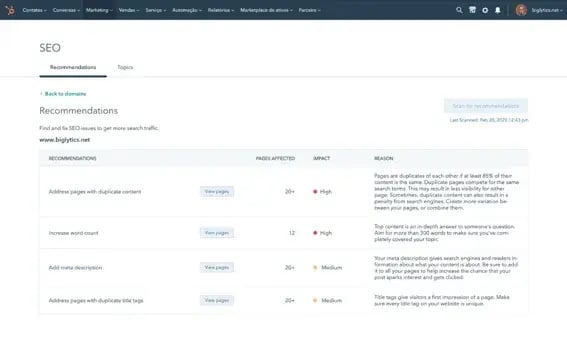
Why it matters: Marketing Hub connects your SEO insights to real business outcomes. Track performance, analyze SEO growth, manage content clusters, assign tasks, and measure the impact of your audit on traffic and conversions.
Pricing: Free plan; Starter - $9 per seat/month; Professional - $800/month; Enterprise - $3,600/month
Useful resources:
- View SEO recommendations in HubSpot
- Analyze SEO performance in HubSpot
- Understanding SEO recommendations
Frequently Asked Questions About SEO Audits
How long does an SEO audit take?
Most SEO audits take between two and eight weeks, depending on the size and complexity of the site, and the depth of coverage. For example, smaller sites can be completed in a few days, while enterprise sites with thousands of URLs, multiple templates, and complex technical structures take longer.
The analysis and stakeholder alignment phases often require the most time and are the most important. While a large portion of the audit involves data gathering and is fairly subjective, there are areas (such as content ideation) that require creativity. In my experience, creativity needs time to develop. Rush your audit, and risk missing out on creative ideas.
Do I need a developer to complete an SEO audit?
SEO specialists shouldn’t rely on developers to run the audit, but developers are often needed to implement parts of it. SEOs can diagnose and document technical issues, but fixes such as template-level changes, Core Web Vitals improvements, structured data implementation, and JavaScript cleanup typically require development support. The audit itself identifies the work; the developer helps execute it.
How often should you run an SEO audit?
Most businesses benefit from a quarterly, biannual, or annual audit. Regular SEO audits help maintain and grow search performance over time.
Fast-moving companies, sites with frequent content updates, or businesses heavily impacted by AI search changes may benefit from more frequent checks. At a minimum, run a full audit once per year to benchmark performance and flag unexpected declines.
What tools do I need for a free SEO audit?
You can run a basic audit using free tools, including:
- HubSpot Website Grader – A quick health snapshot.
- HubSpot AEO Grader – Evaluates AI visibility and entity clarity.
- Google Search Console – Performance, indexing, and coverage reports.
- Google Analytics – Traffic and engagement insights.
- Screaming Frog (free up to 500 URLs) – Technical crawling.
These tools cover core areas: crawlability, indexability, content quality, and AI search visibility.
What’s the difference between an SEO audit and a website audit?
An SEO audit focuses on the elements that influence rankings, visibility, and conversions — technical health, content quality, backlinks, and AI visibility.
A website audit is broader. It may include UX design, accessibility, CRO, branding, navigation, and overall site performance.
You can think of an SEO audit as one part of a full website audit. Both can be combined, but the SEO audit is more specialized and directly tied to traffic growth and search performance.
Modern SEO audits go beyond blue links.
A well-executed SEO audit doesn’t just surface problems; it turns your website into a growth engine. By reviewing your technical health, content quality, authority signals, and AI search visibility, you can uncover quick wins, shape long-term strategy, and build a roadmap that directly supports traffic, conversions, and pipeline.
Remember: Modern audits go beyond blue links; they evaluate how well your brand shows up in generative search and whether your content is truly understood as an entity. If you want a fast, accurate snapshot of where you stand, tools like HubSpot Website Grader and HubSpot AEO Grader make it easy to assess both SEO fundamentals and AI visibility in minutes.
From my experience, the most impactful audits are the ones rooted in business goals and executed collaboratively. I love the point in the process when the data clearly aligns with what stakeholders feel intuitively — or reveals something completely unexpected. When an audit is done well, teams walk away feeling focused, confident, and energized because the path forward is so clear. That’s the sign of a great audit: One that doesn’t just diagnose, but inspires action and drives real results.
